Subsections of What's New
IronCAD Mechanical V. 2027.02
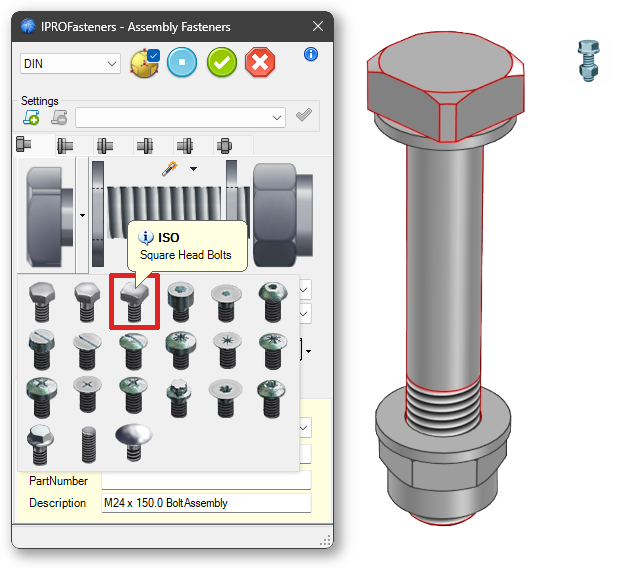
The bolt with a Square Head has also been added to the Fasteners Assembly dialog box.
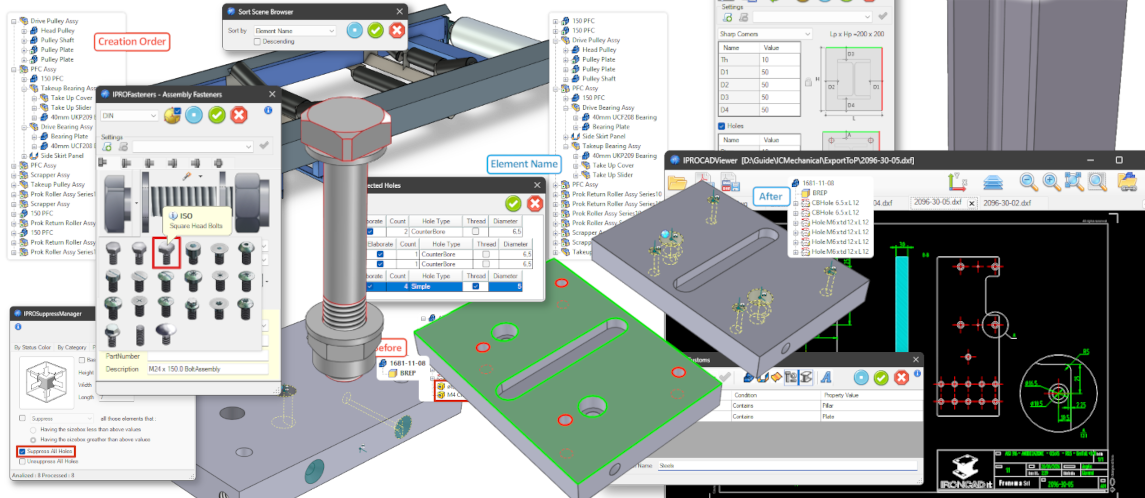
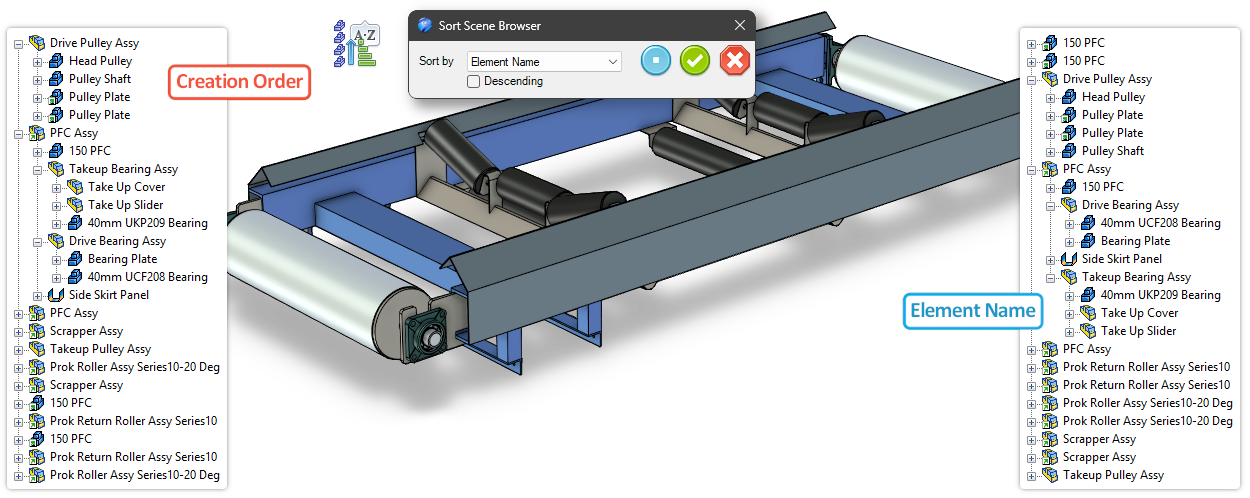
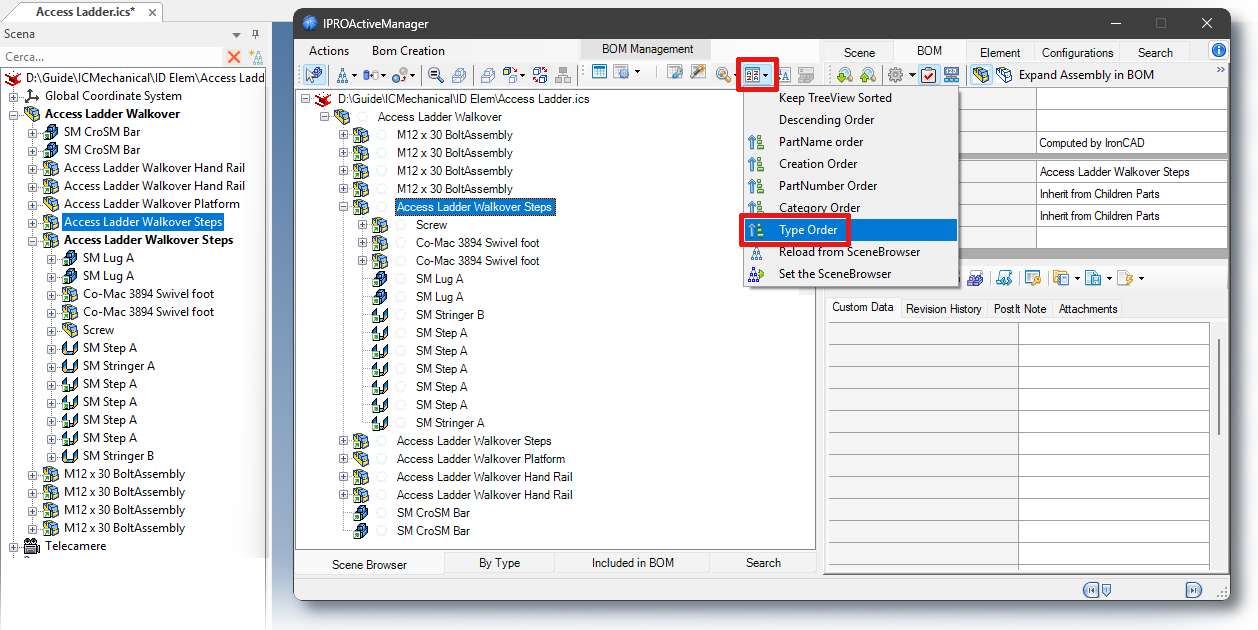
Added a Tool to the ICM Data Catalog to sort the SceneBrowser by Element Name, Part Number, Creation Order, Category, and Element Type.
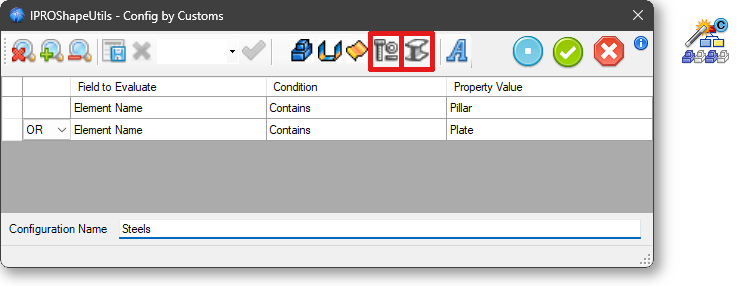
Added to Config By Property the ability to select “Fasteners” and “Steels” as search criteria.
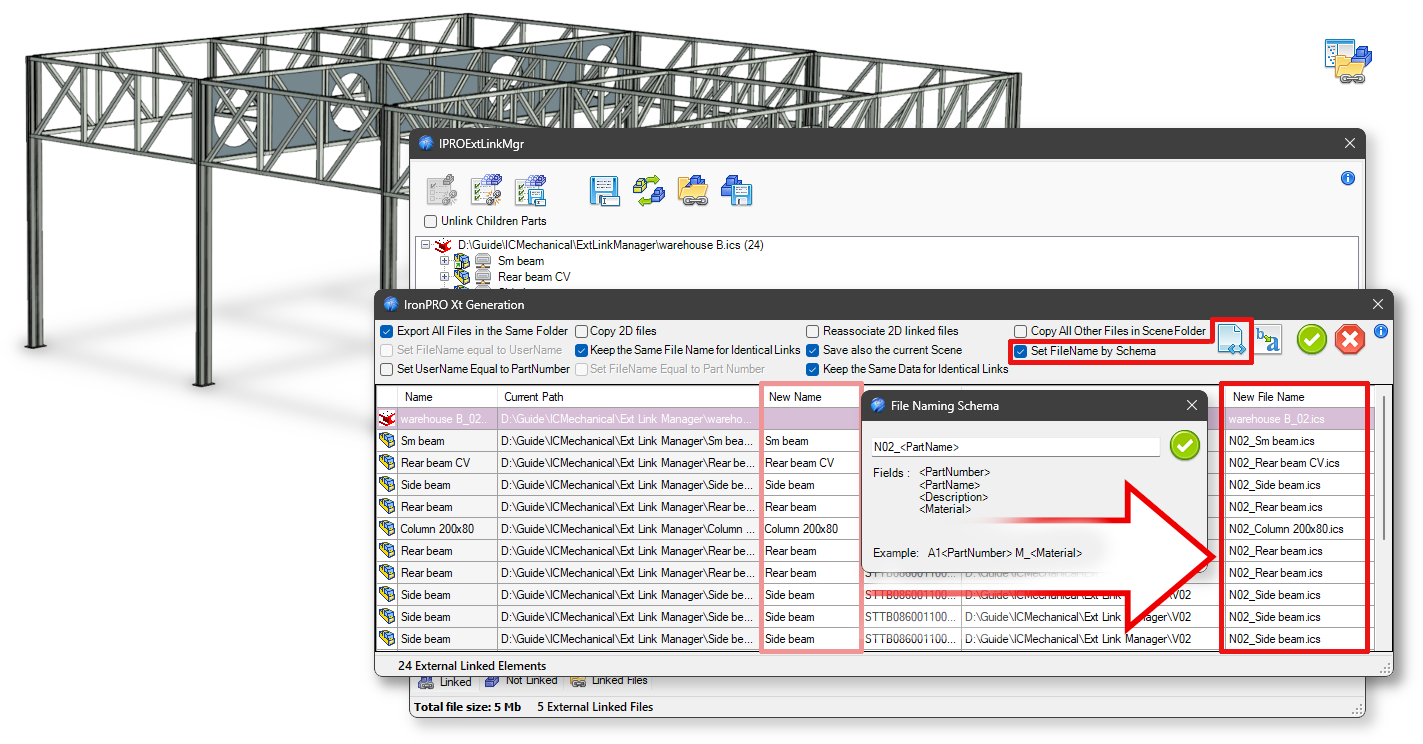
Added the “Set File Name by Schema” option for define the file name in the “Save All” dialog.
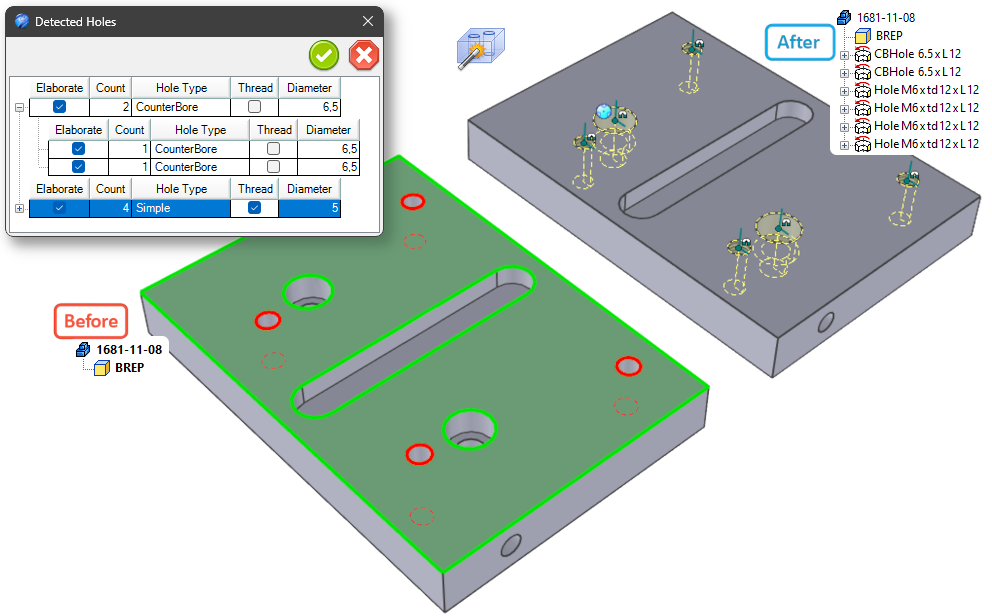
Improved hole recognition for imported components, improved the dialog box, added a preview for the active selection, and improved the selection of holes to be threaded and the processing of holes.
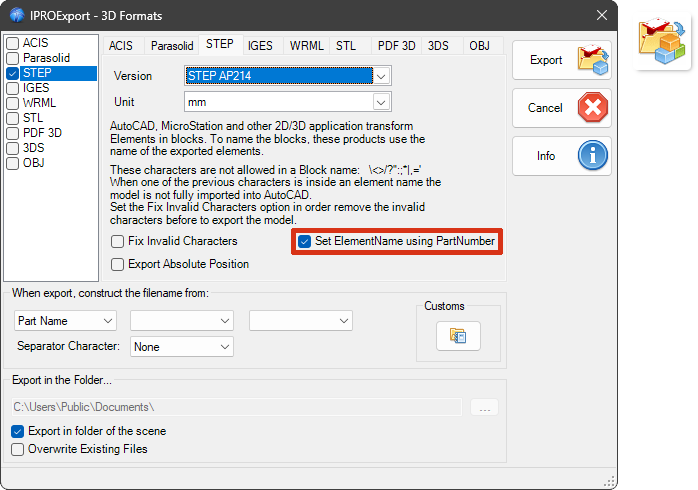
Option to export elements to STEP with a name matching the PartNumber.
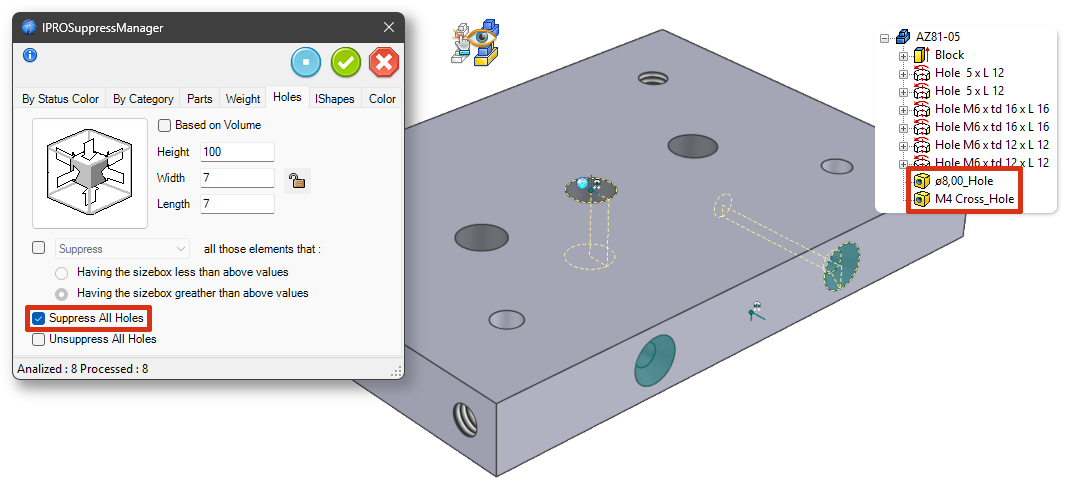
Custom Holes are now also supported and can be Suppressed as well.
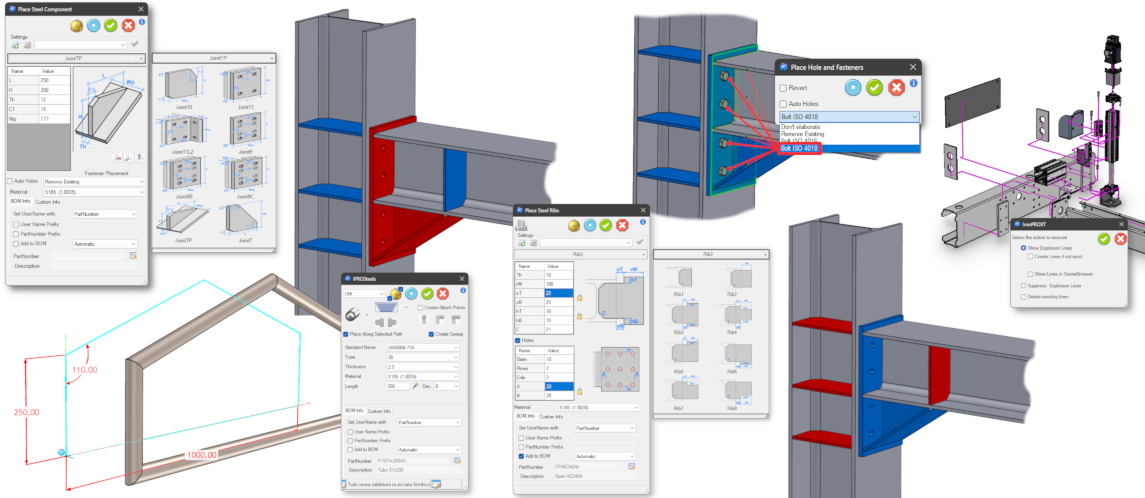
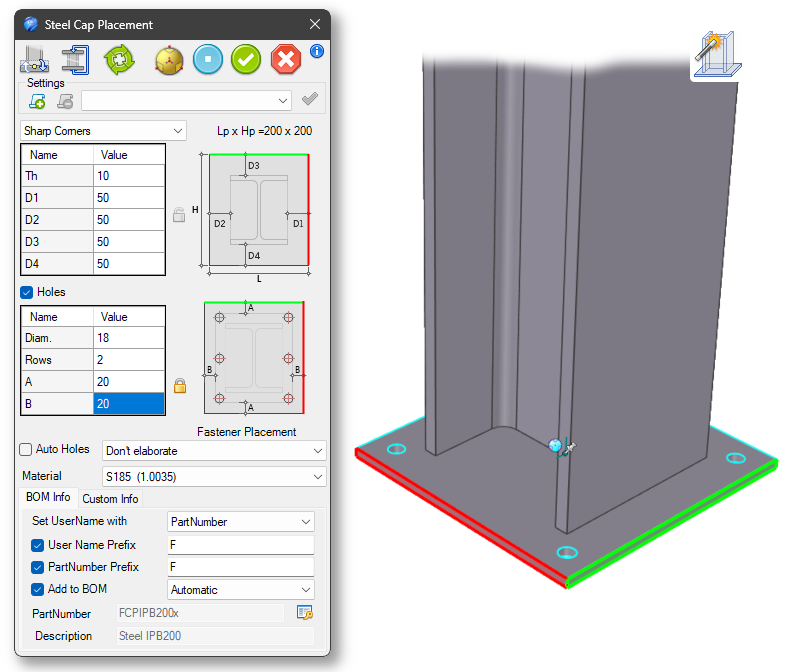
The tool for positioning joints and bolts has been improved; positioning is now easier as well.
Added color coding to the faces of the CAPs to simplify the definition of parameters D1 and D3.
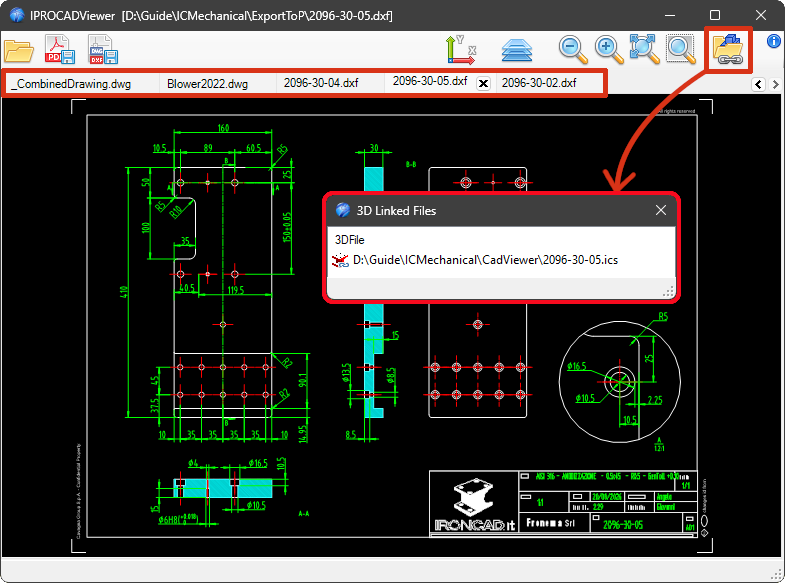
Improved overall functionality, including tabbed browsing for opening multiple drawings and the implementation of Drag&Drop from the File Manager onto the CAD Viewer window to open drawings directly.
Added the ability to view ICS files linked to the DWG file.

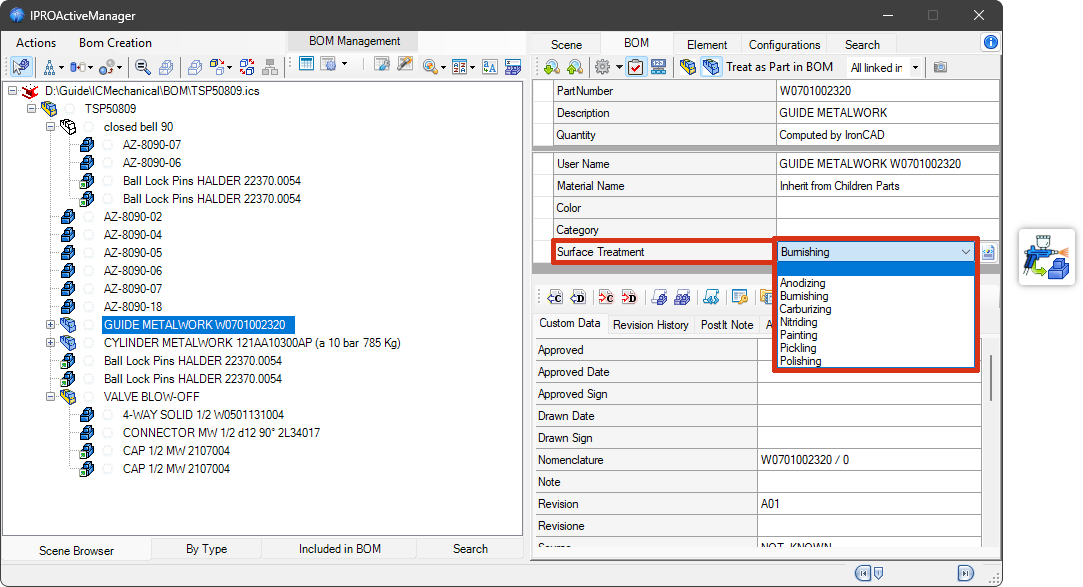
Added support for managing a CustomData field to configure “Surface Treatment”.
And, in the same context, the tool was also added to the ICM Data Catalog to apply the Surface Finish to the part using Drag&Drop.
IronCAD Mechanical V. 2027.01
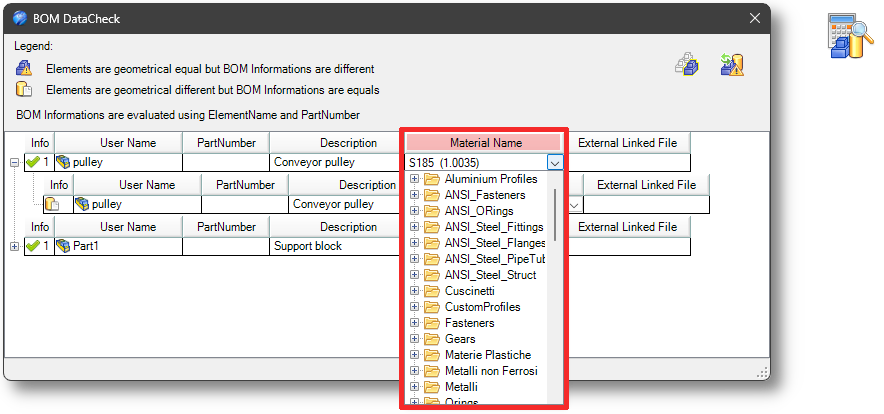
In the CheckBOM command, a column for material verification has also been added.
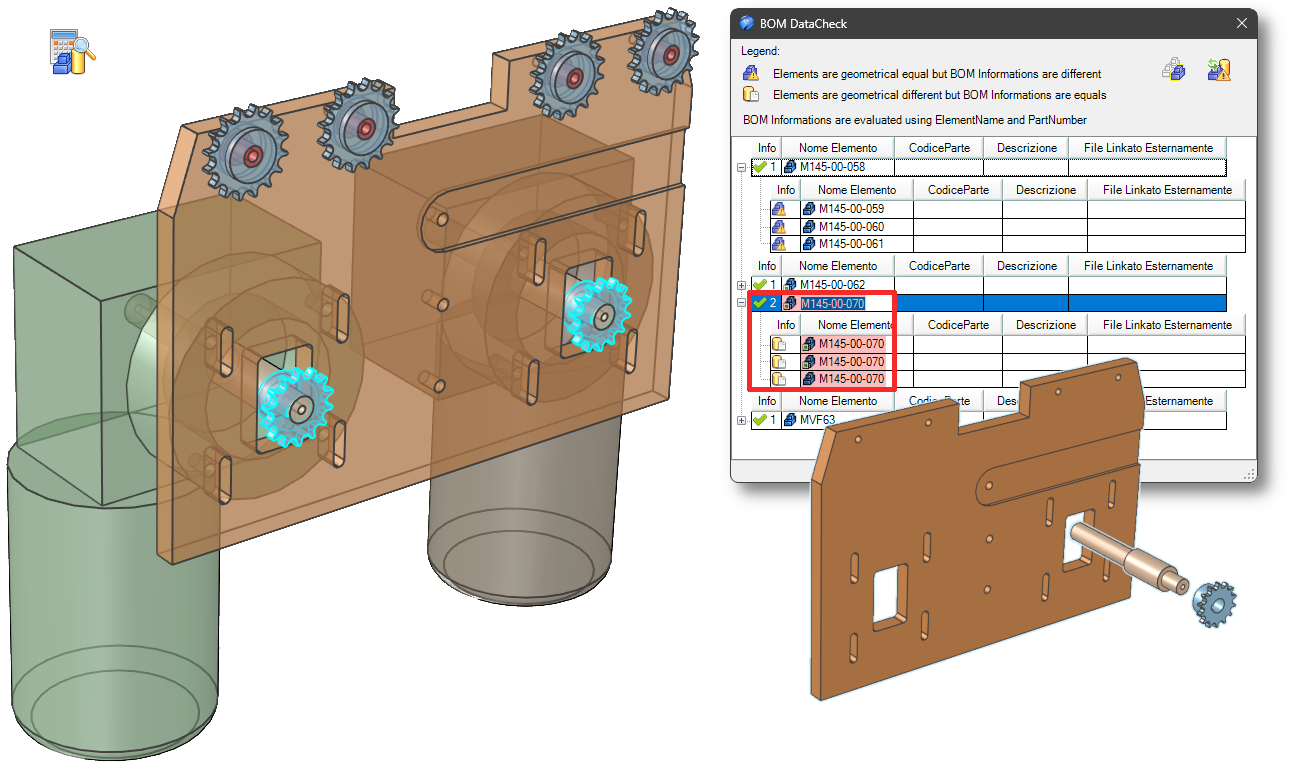
This tool verifies whether elements have different shapes but share the same Name/PartNumber. It also reports elements with identical shapes but different Names/PartNumbers. Material has now also been added to the check.
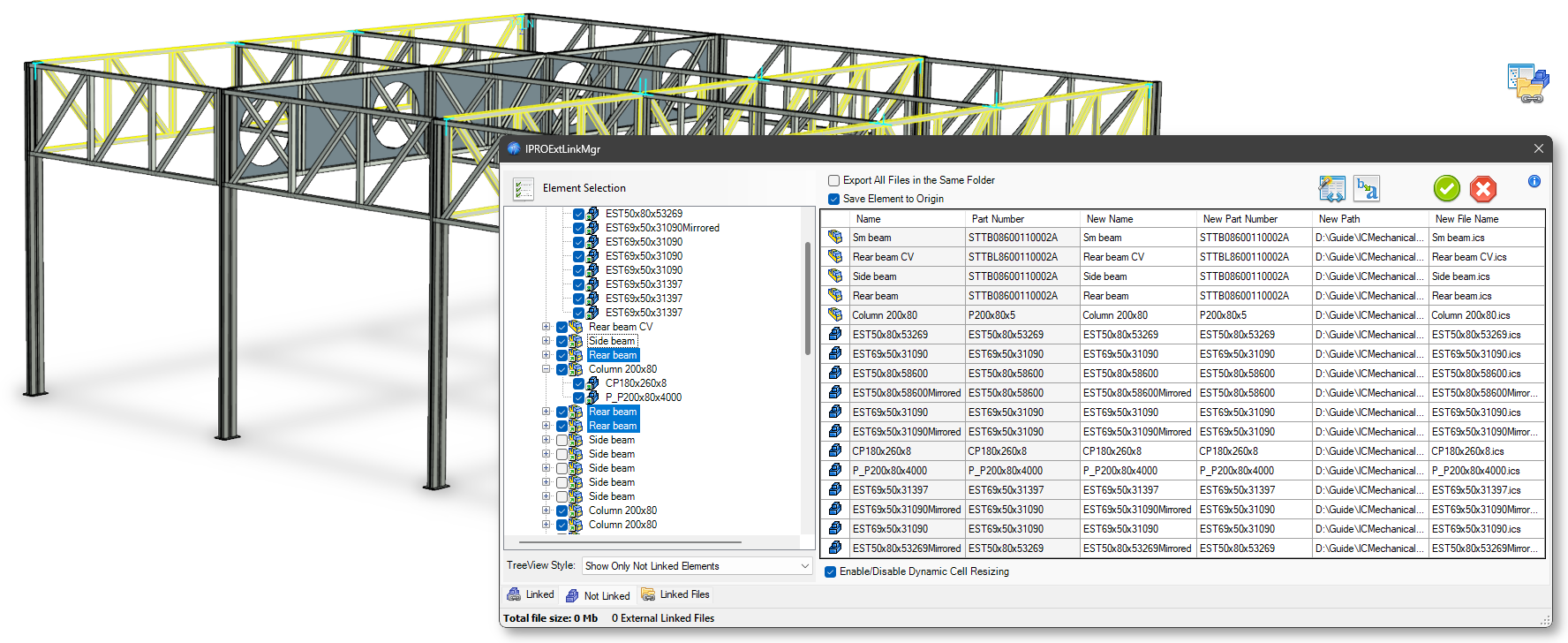
Added functionality to manage internally linked elements placed in different assemblies. IronCAD does not support - and prevents - the external saving of one of these links while maintaining the connection. With the “Save Unlinked Elements” operation, such elements are now saved and then re-linked as external links to all previously internally linked elements.
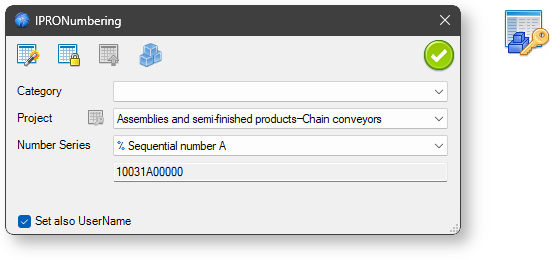
Implemented the ability to define a persistent, generic counter that is not associated with any project. To define this type of counter, the name must start with %.
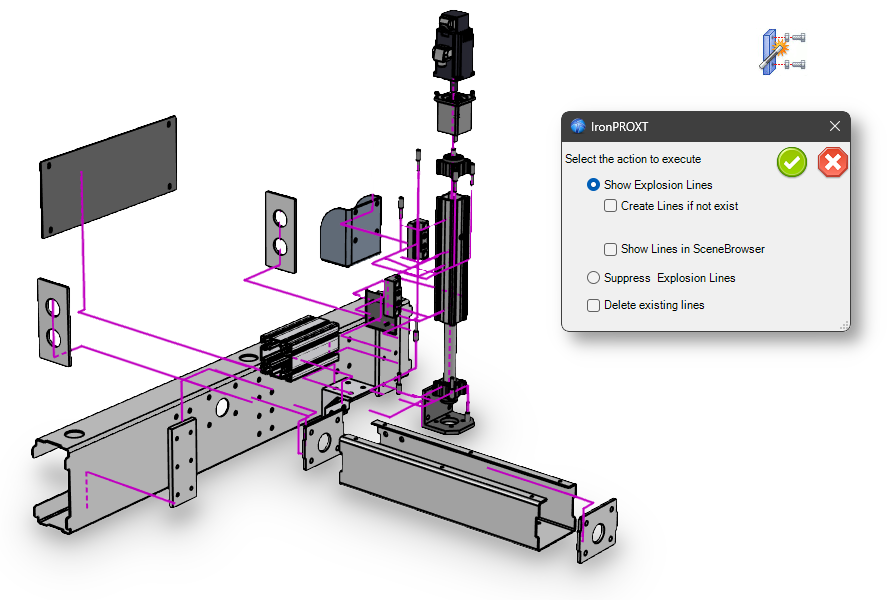
Explosion lines are now drawn orthogonally.
When creating a profile along a path in sweep mode, the selected profile is copied and embedded into the new part. This allows the generated profile to be controlled through any constraints and parameters defined in the original profile.
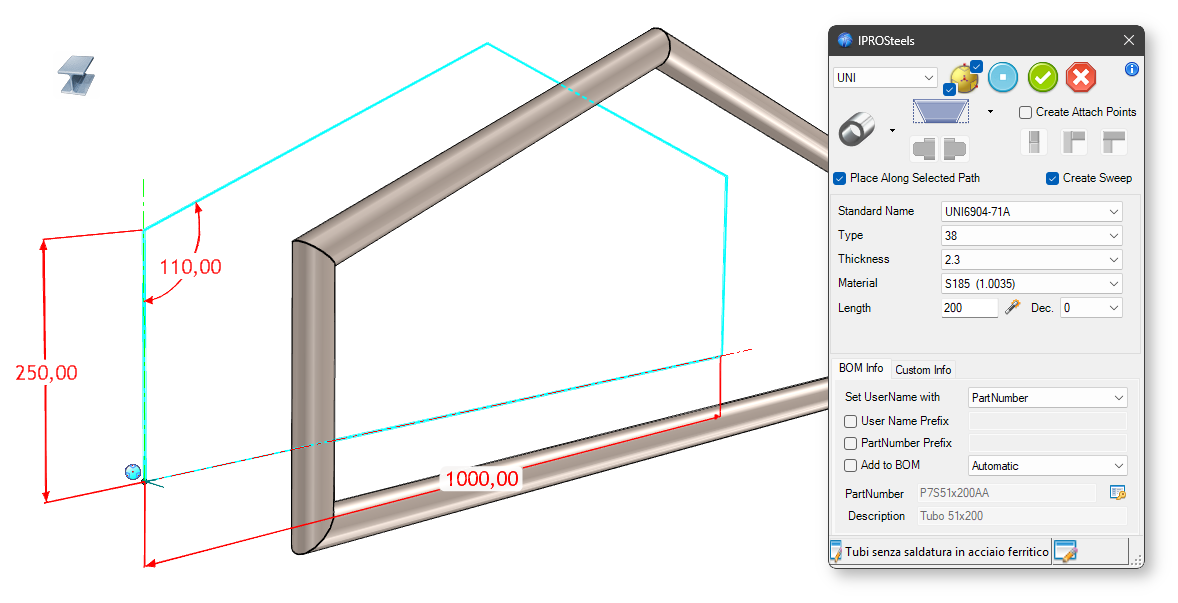
Dialogs have been updated to allow changing the component type. The interface is now more consistent, including how the element’s display mode is configured.
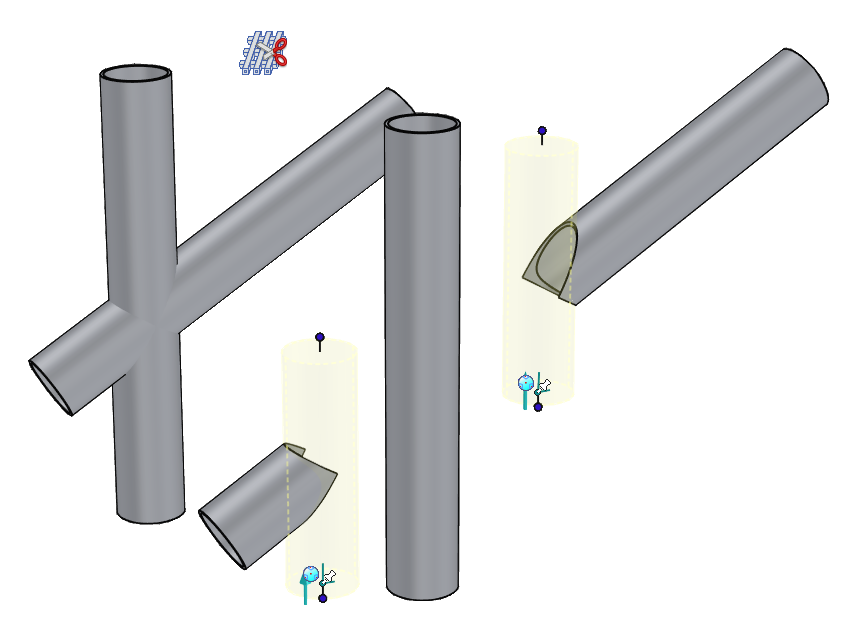
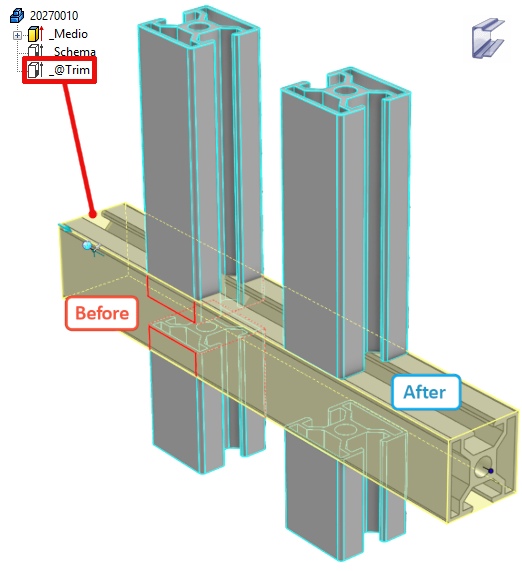
Trimming on tubular profiles is now performed using the negative shape of the reference tube rather than a flat reference face.
The interface for placing steel stiffener has been improved.
Create holes: If the checkbox is active, you can enter values for the holes, their diameters, and their distances. You can now add the desired number of holes using the table, choosing the number of rows and columns.
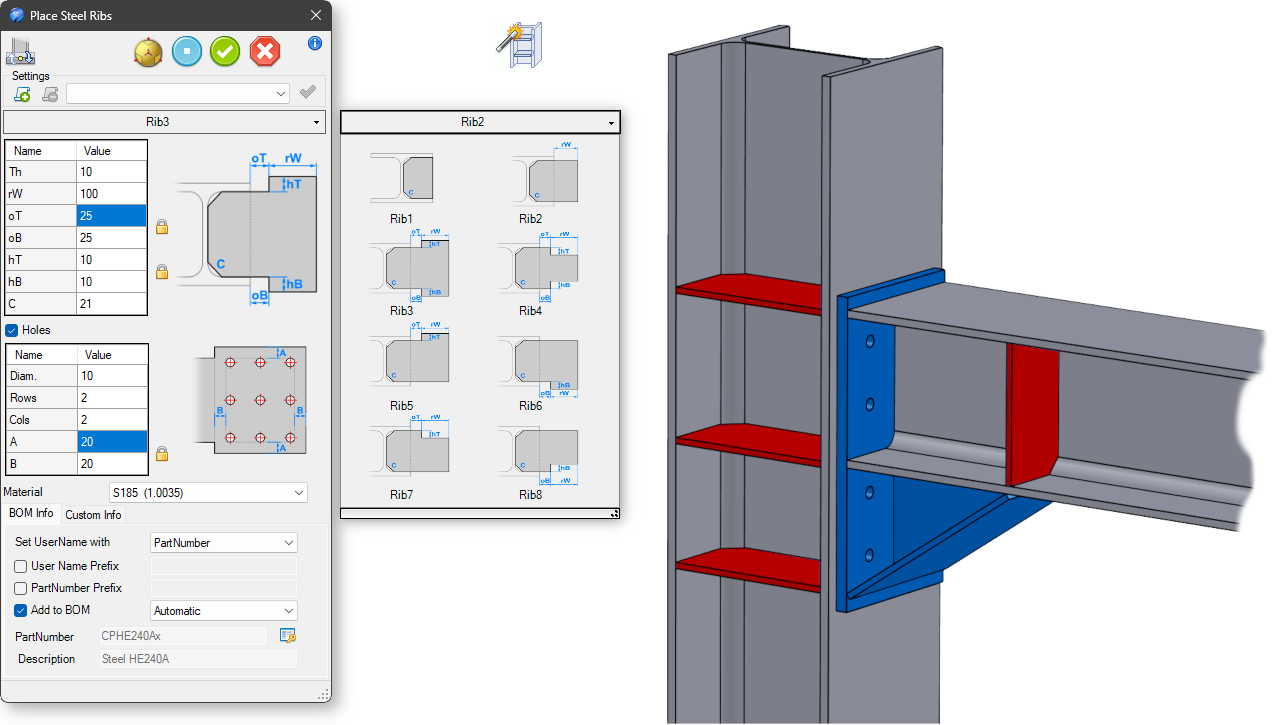
An option has been implemented to place reinforcements on H-profiles in a single operation. Management of lateral reinforcements on C and H profiles has also been improved.
This new tool allows you to apply joints to steels.
The Place Steel component’s interface is similar to that of the Steel Stiffener.
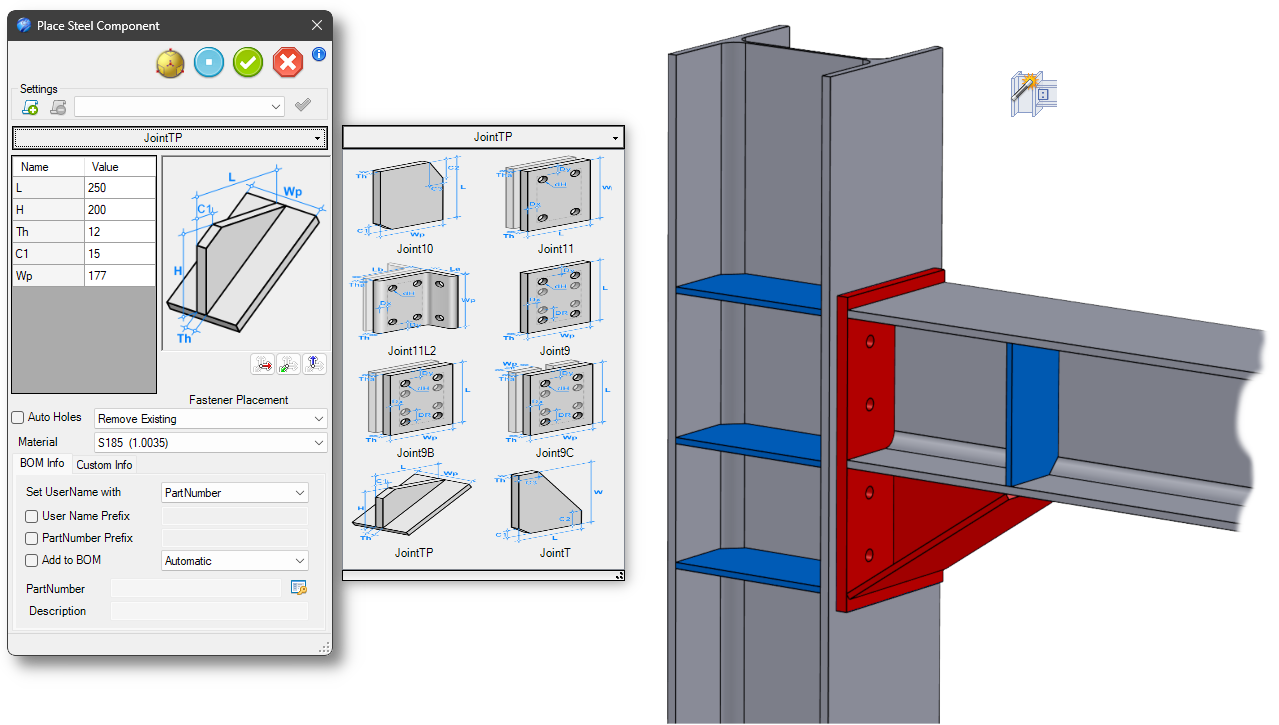
You can also automatically create holes in the steel and/or insert fasteners directly by selecting bolts from the list.
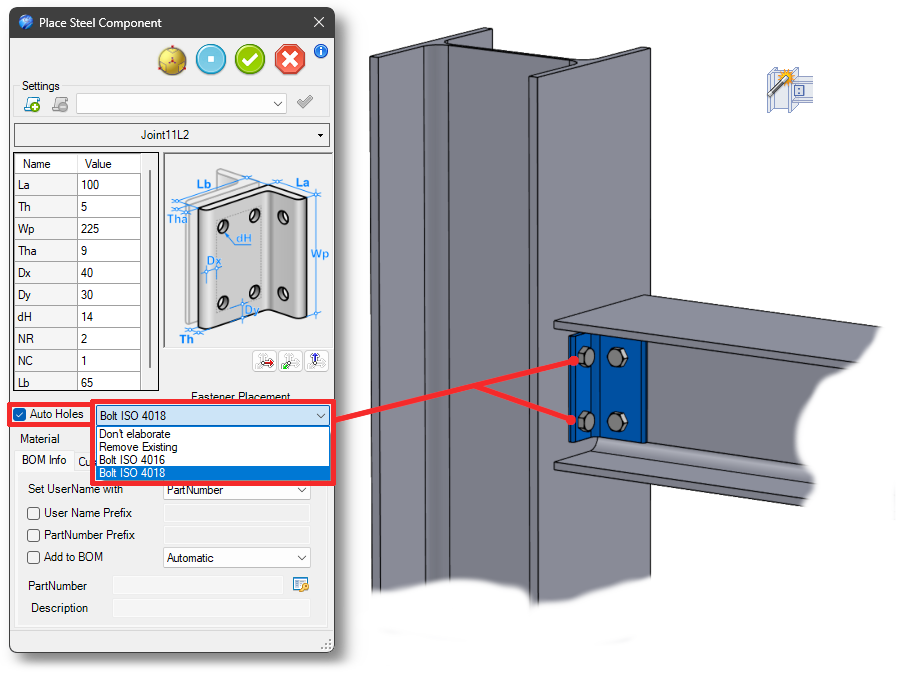
You can also add components to the library as a user.
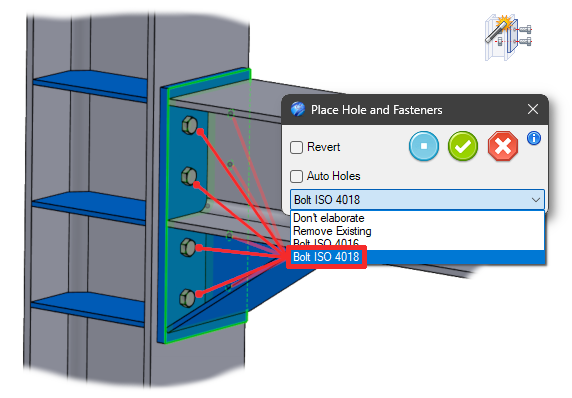
This new tool allows you to place bolts in all the holes on a steel plate.
You can also add the corresponding holes to the steel beneath
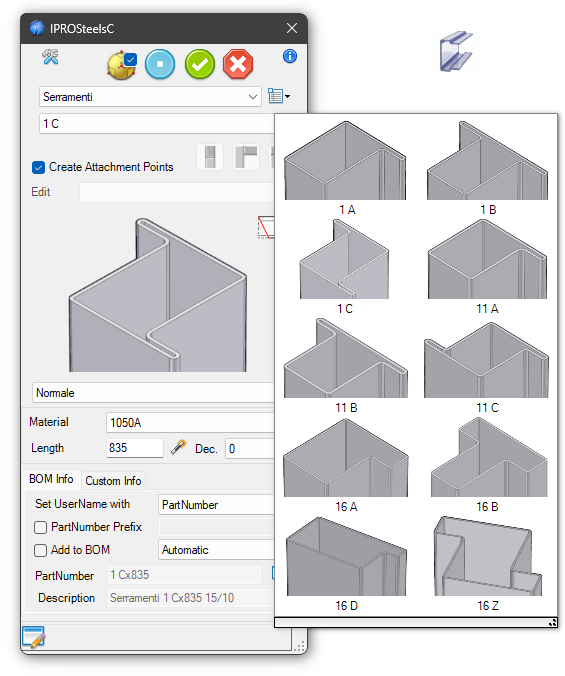
The dialog boxes have been updated to allow you to change the profile type. The interface is now more consistent, including the configuration of the element’s display mode.
When you change the profile, the attachment points are regenerated (if necessary). This ensures that any connected profiles are linked correctly, preventing them from shifting to unpredictable positions.
Color and texture information is now also retrieved from the library profile.
New profile types for windows and doors have been added

When creating multiple BOMs for selected assemblies, only a single BOM is now generated in the case of identical elements.
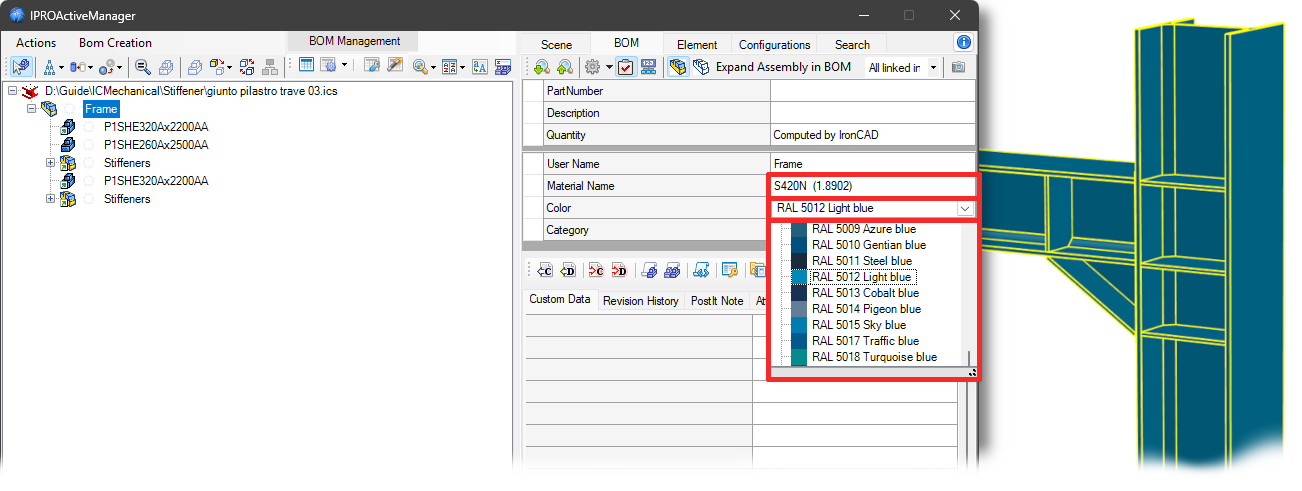
Added the ability to assign and display Material and Color at the assembly level.
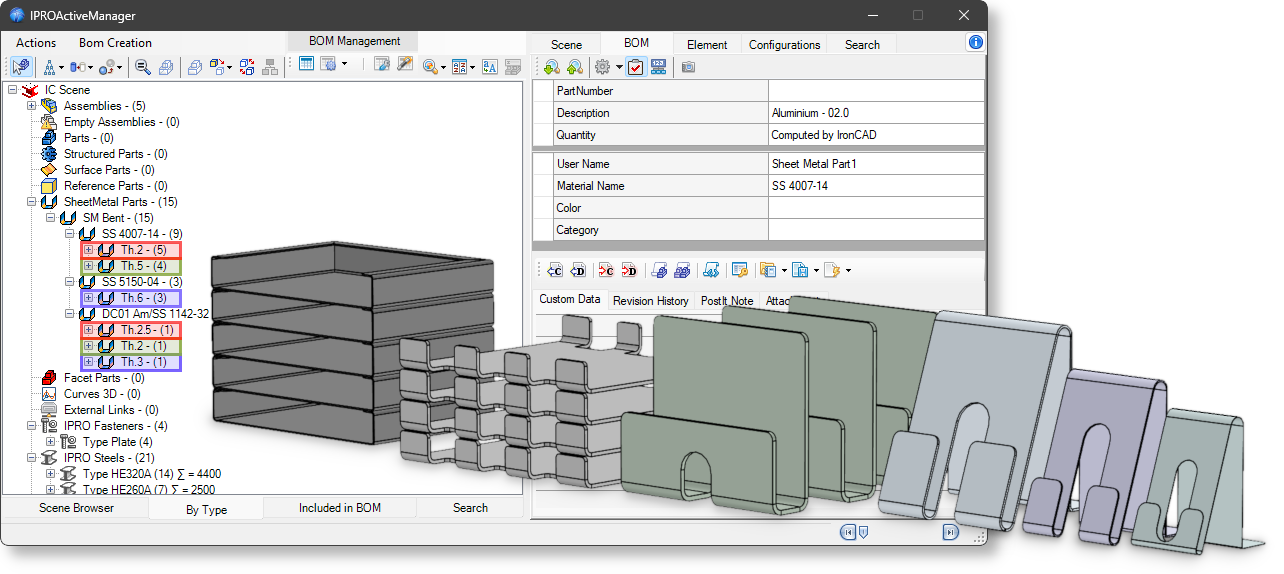
In the type tree view, an additional level has been introduced for sheet metal parts to group them by thickness.
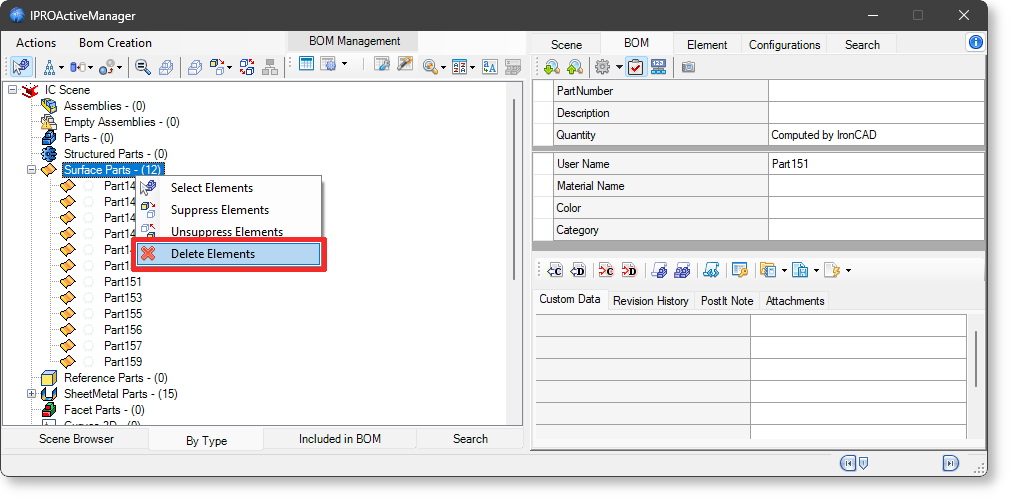
A context menu has been added to the ByType tree view, which becomes visible when selecting the group of surface elements. This menu allows deletion of the selected elements.
IronCAD Mechanical V. 2026.01
This new tool allows the customers to check consistency between Element Name and PartNumber on the elements in the model or in the selected assemblies.
This tool verifies whether the elements have different shapes but have the same Name/PartNumber. It also reports element having the same shape but different Names/PartNumbers.
Added option in the data file to add a radius to the internal corners of the hollow made by the O-rings.
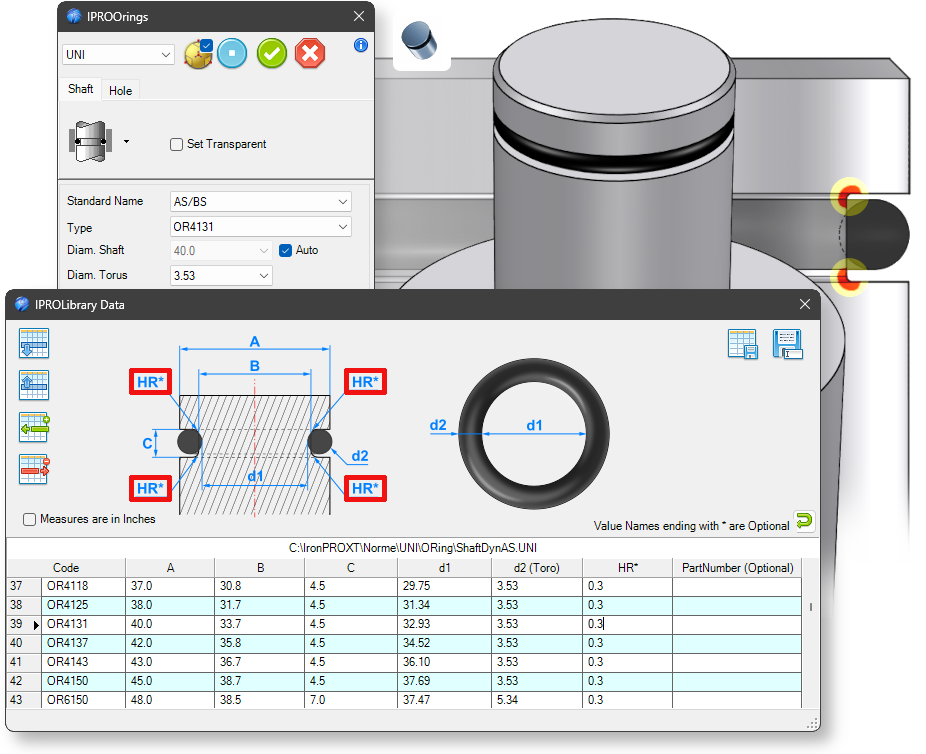
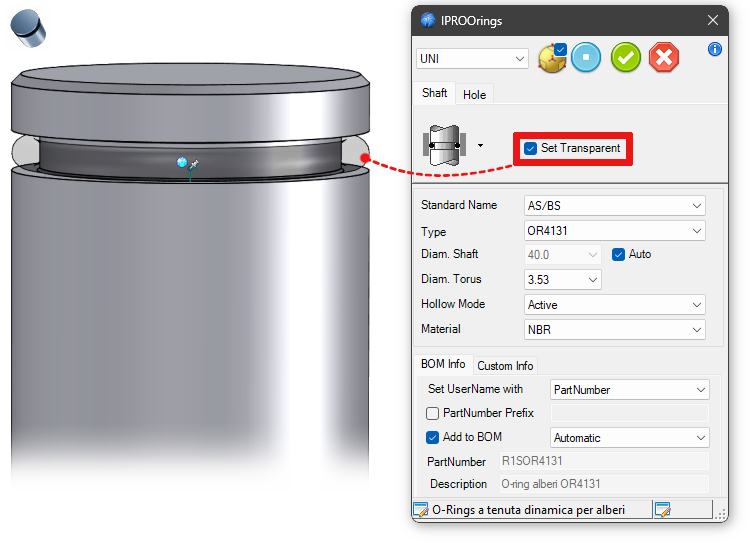
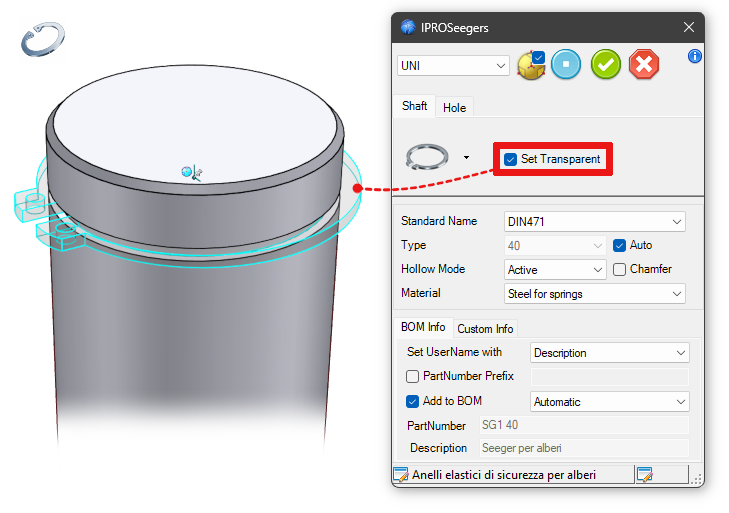
Added the Set Transparent option to allow easier placement of the component.
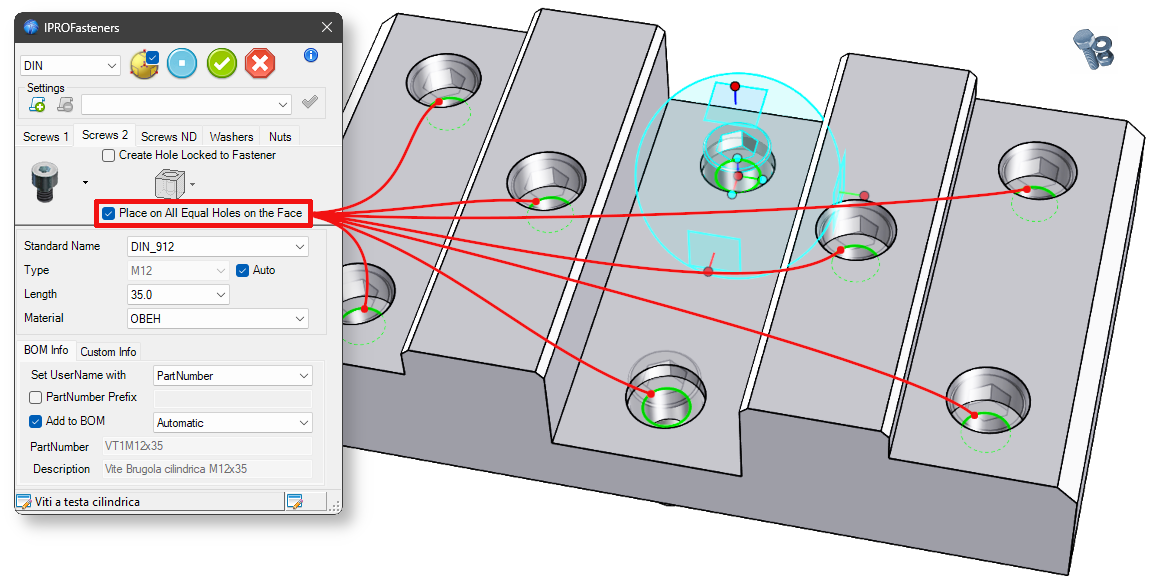
Improved functionality for positioning screws in holes on a face. The command now processes all edges that have the same size and normal direction as the selected face. This ensures that all screws are positioned correctly, even when selecting the bottom edge of a recessed hole or when the edges are on different surfaces.
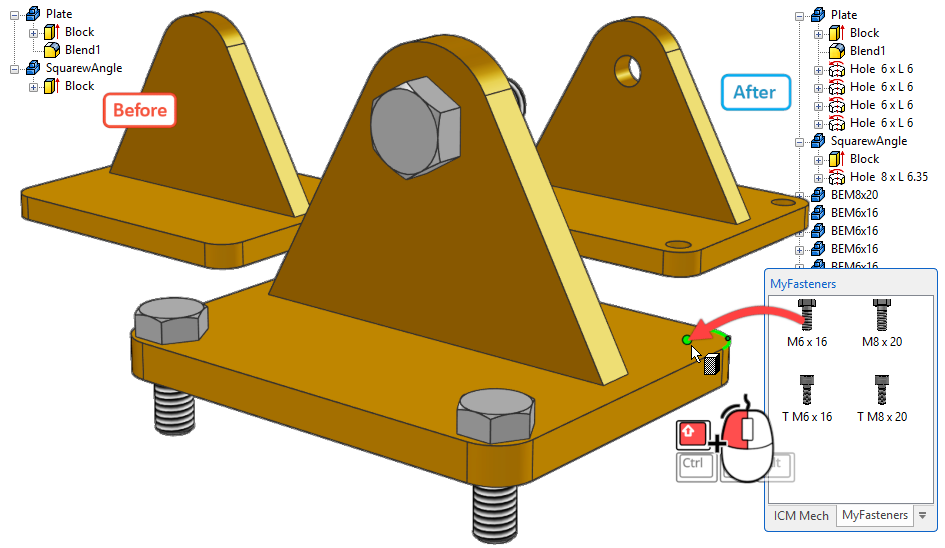
Fastening devices saved in the catalog can now drill through the element they are dropped onto when placed in the scene; to create the hole upon release, keep hold down the Shift key.
Improved creation of holes and recesses (for shafts and bearings), and added an icon to reverse the position of the TriBall.
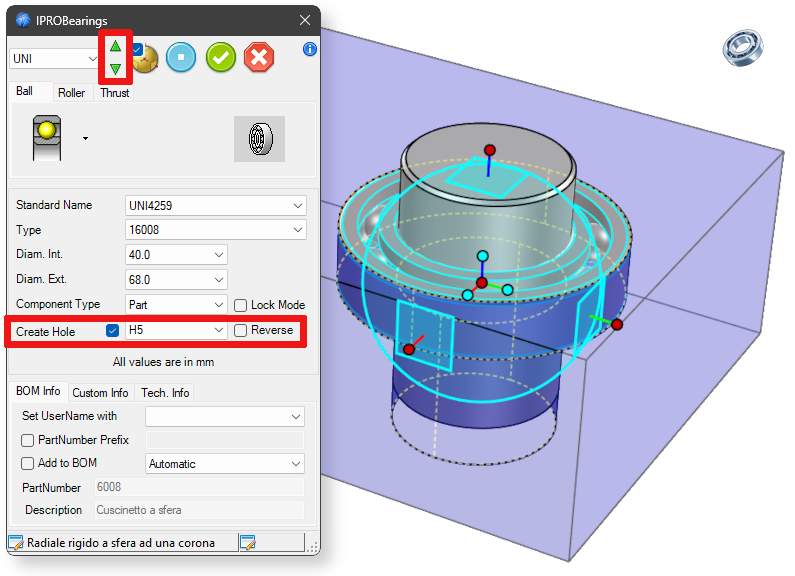
Added the Set Transparent option to allow easier placement of the component.
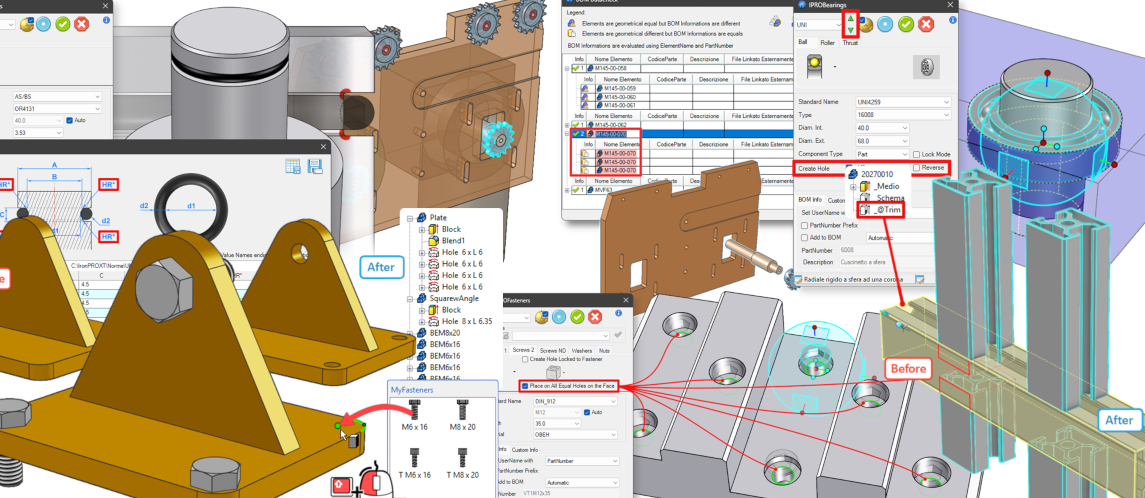
The cutting function in custom profiles has been improved, and the option to define an Intellishape named _@Trim has been added. This IntelliShape will be used as cutting element in the trim functions.
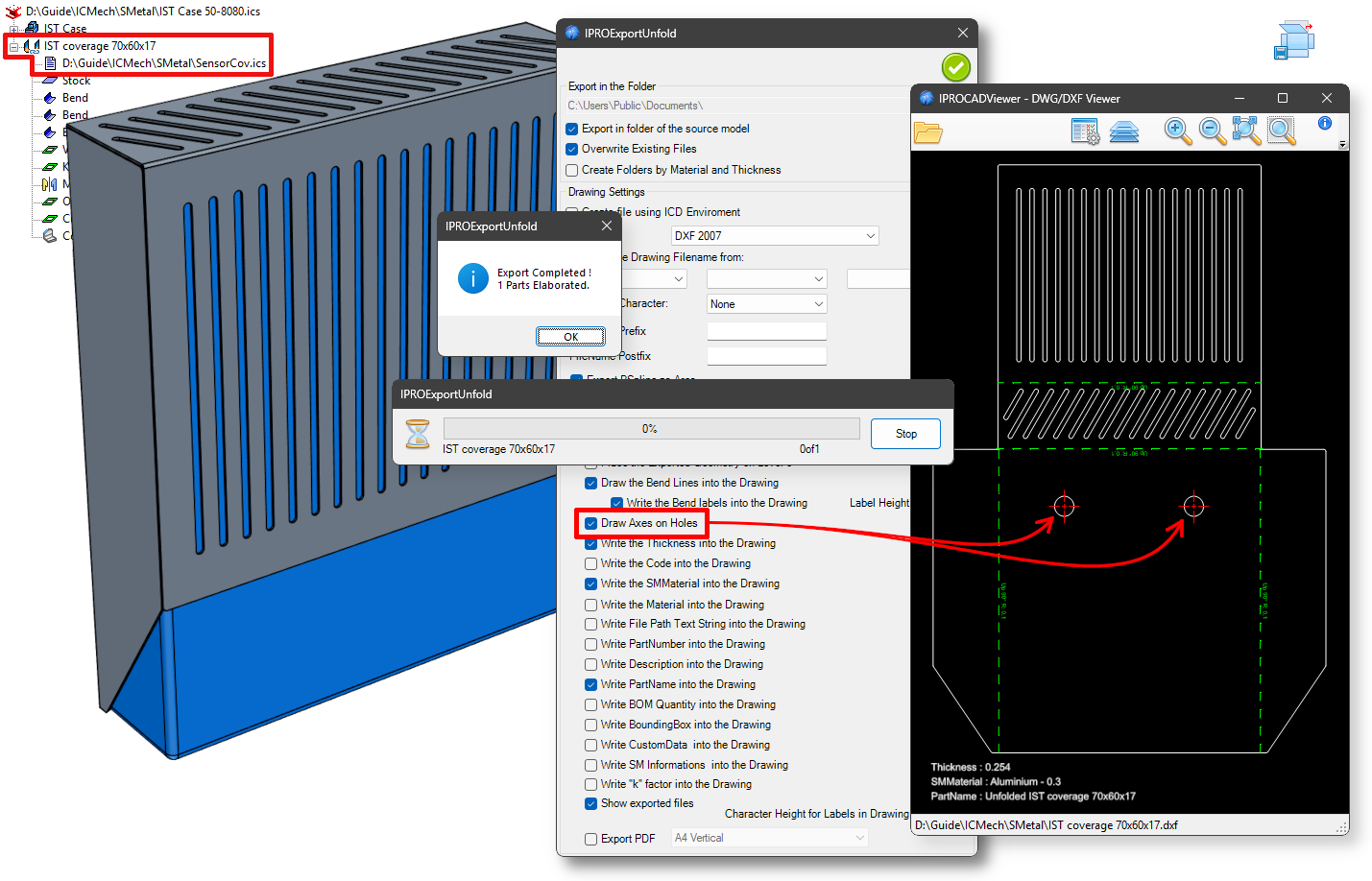
Improved functionality for exporting and managing Sheet Metal parts. Sheet Metal parts in linked externally files are now also directly processed.
Added option for creating axes on circular holes.
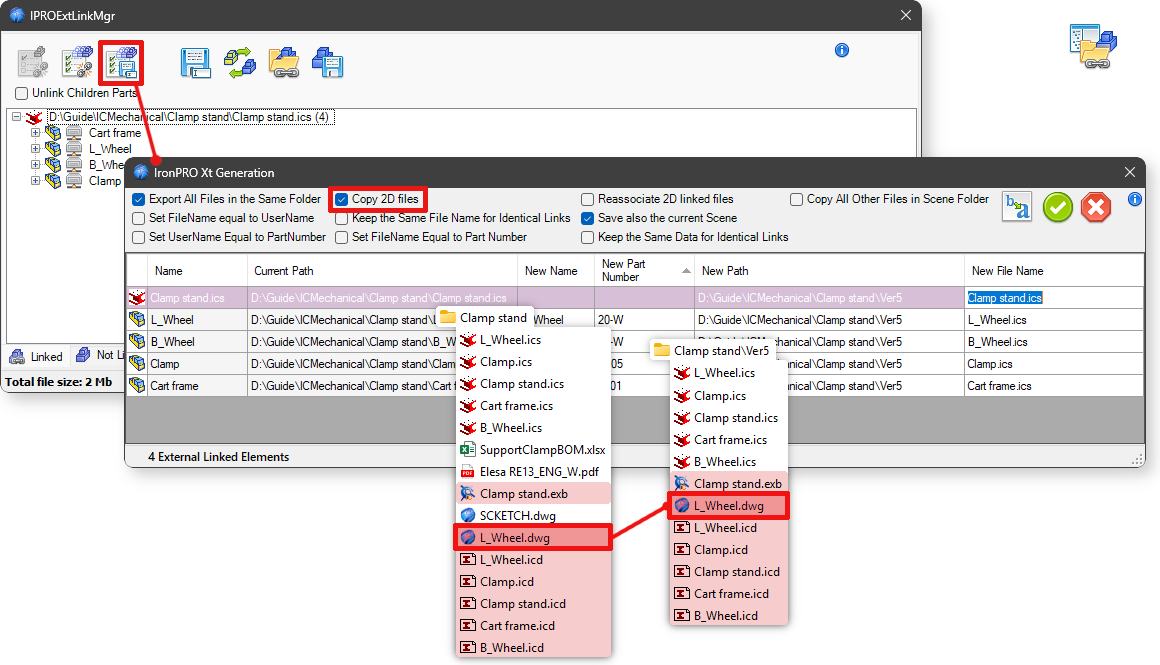
With the Copy 2D files option, the *.icd, *.exb, *.dwg files associated with the main file (which have the same name) are copied.
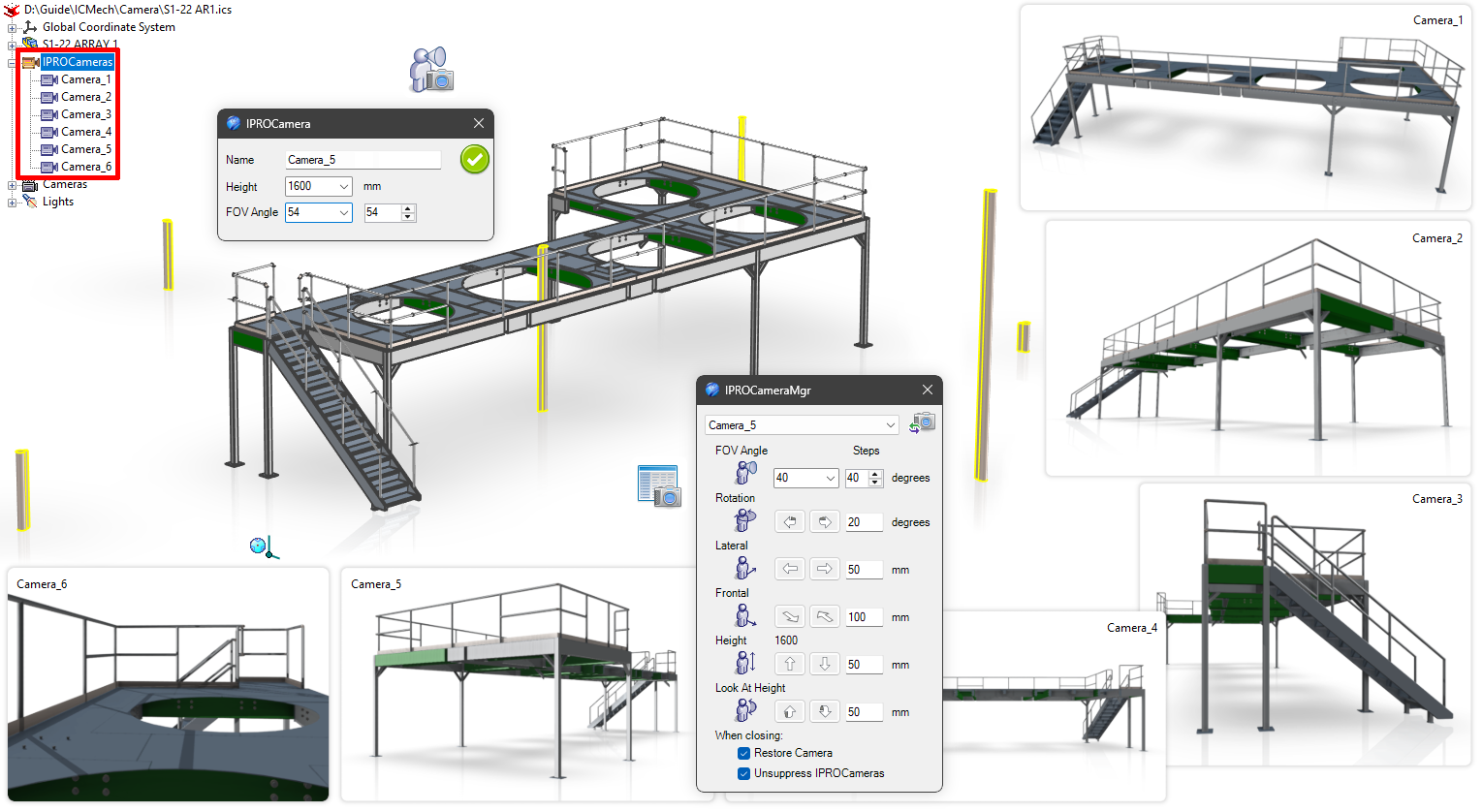
This new tool allows the user to place some IPROCamera parts in the scene and, when required, to look at the model using their position and height. Every IPROCamera can be moved using the TriBall. This tool, used with IPROViewManager is powerful to create images or view for presentations or doc-umentation.

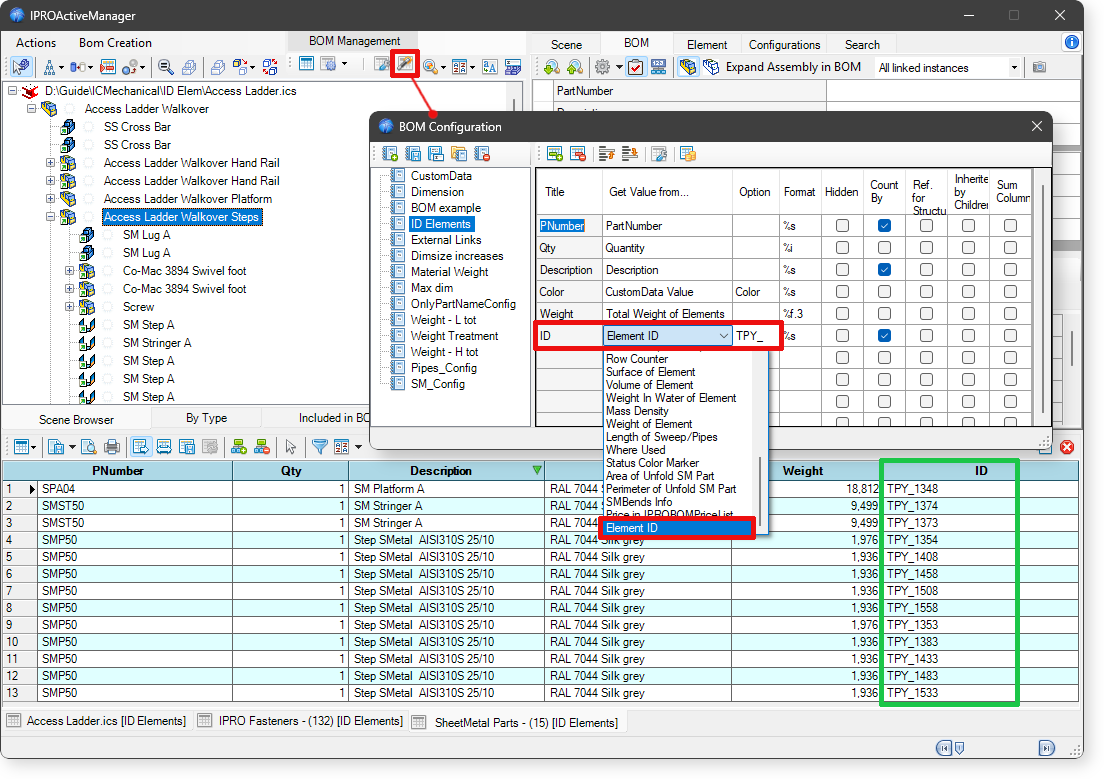
Added the option to include the item ID in the BOM list. Furthermore, by entering a value in the Option field, the text entered will be included and the ID number will be added.
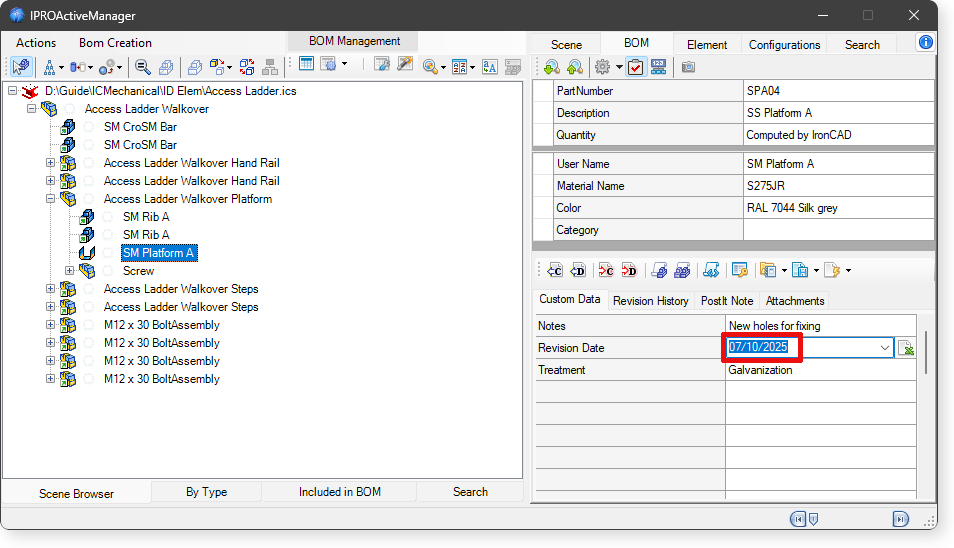
By typing Alt+d in the value field of a CustomData or Property, the current date will be written in the combo box.
Added the option to sort the Scene Treeview. This option allows sorting by Assemblies, Parts, Sheet-Metal, considering the element code.
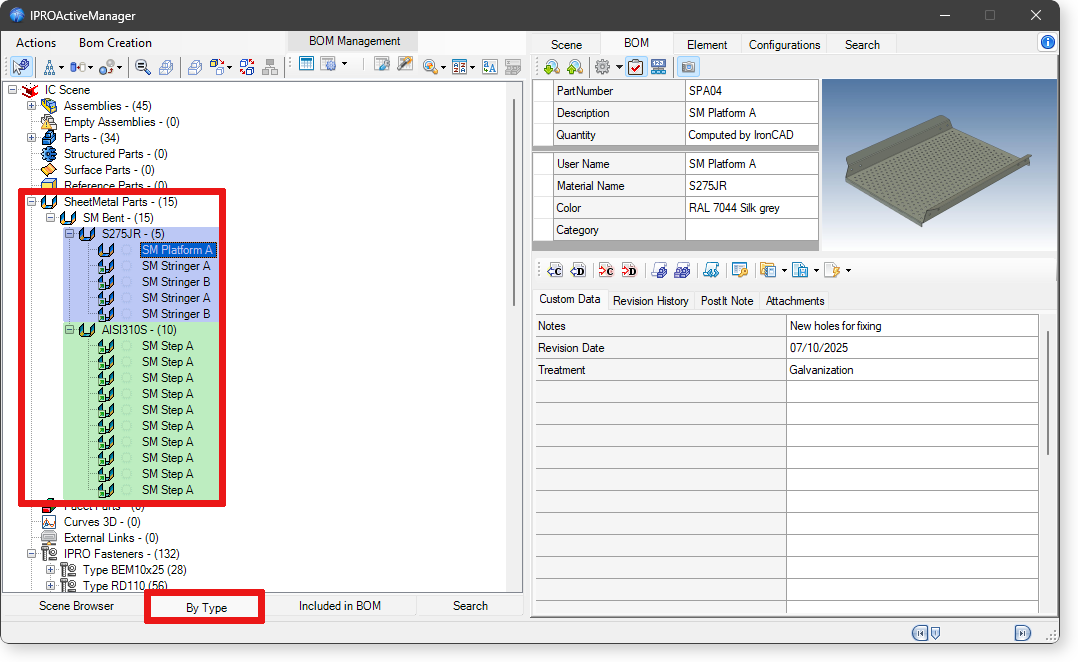
 In the ByType TreeView, Sheet Metal parts are grouped according to their material.
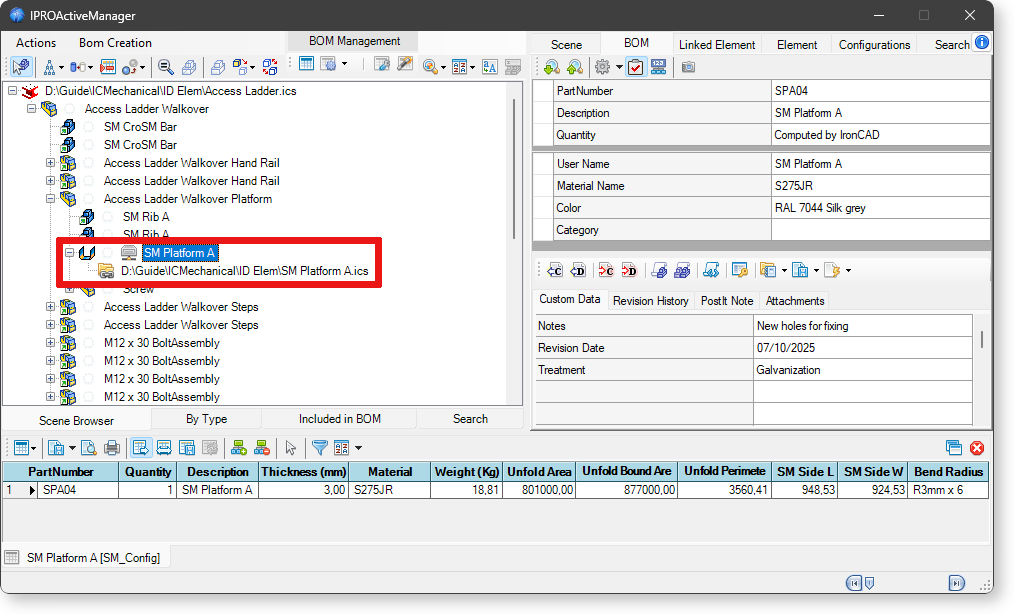
Improved algorithm for detecting values on developed Sheets Metal part (Area, Perimeter, Bend Ra-dius, etc.). This function works also on sheet metals placed is in an externally linked files. This bypass-es an IronCAD rule that does not allow externally linked sheet metal to be developed in the main file.
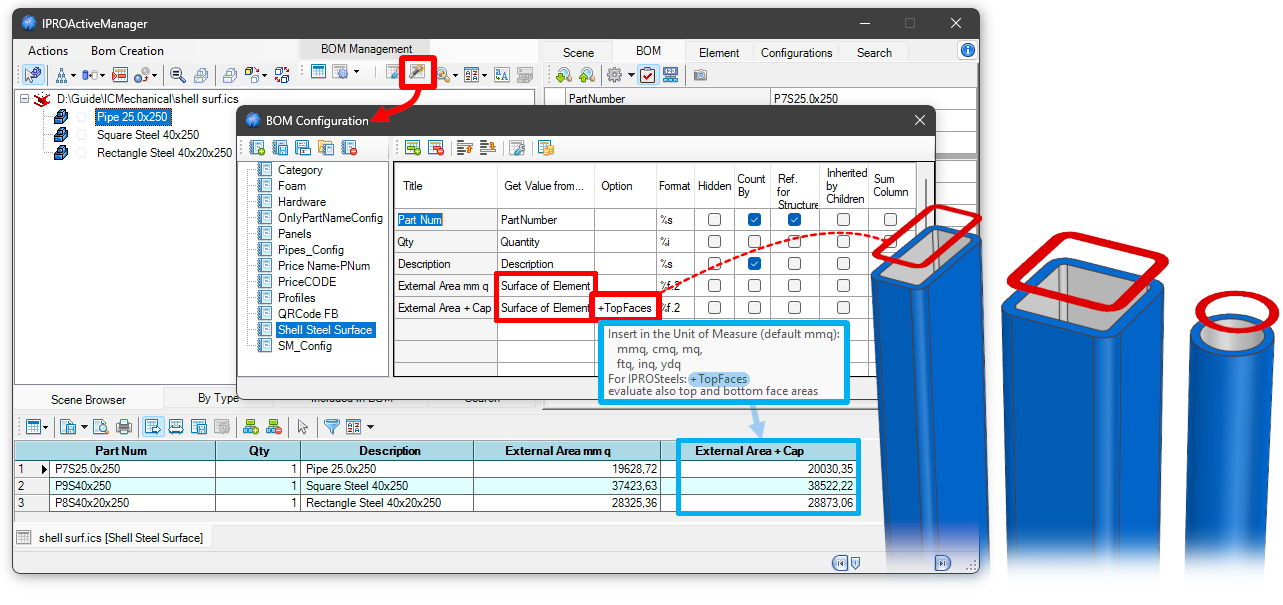
Implemented +TopFaces option for processing the surface value in the bill of materials. In the case of tube, rectangular, and square hollow steels, activating this option also calculates the area of the faces at the top and bottom of the steel.
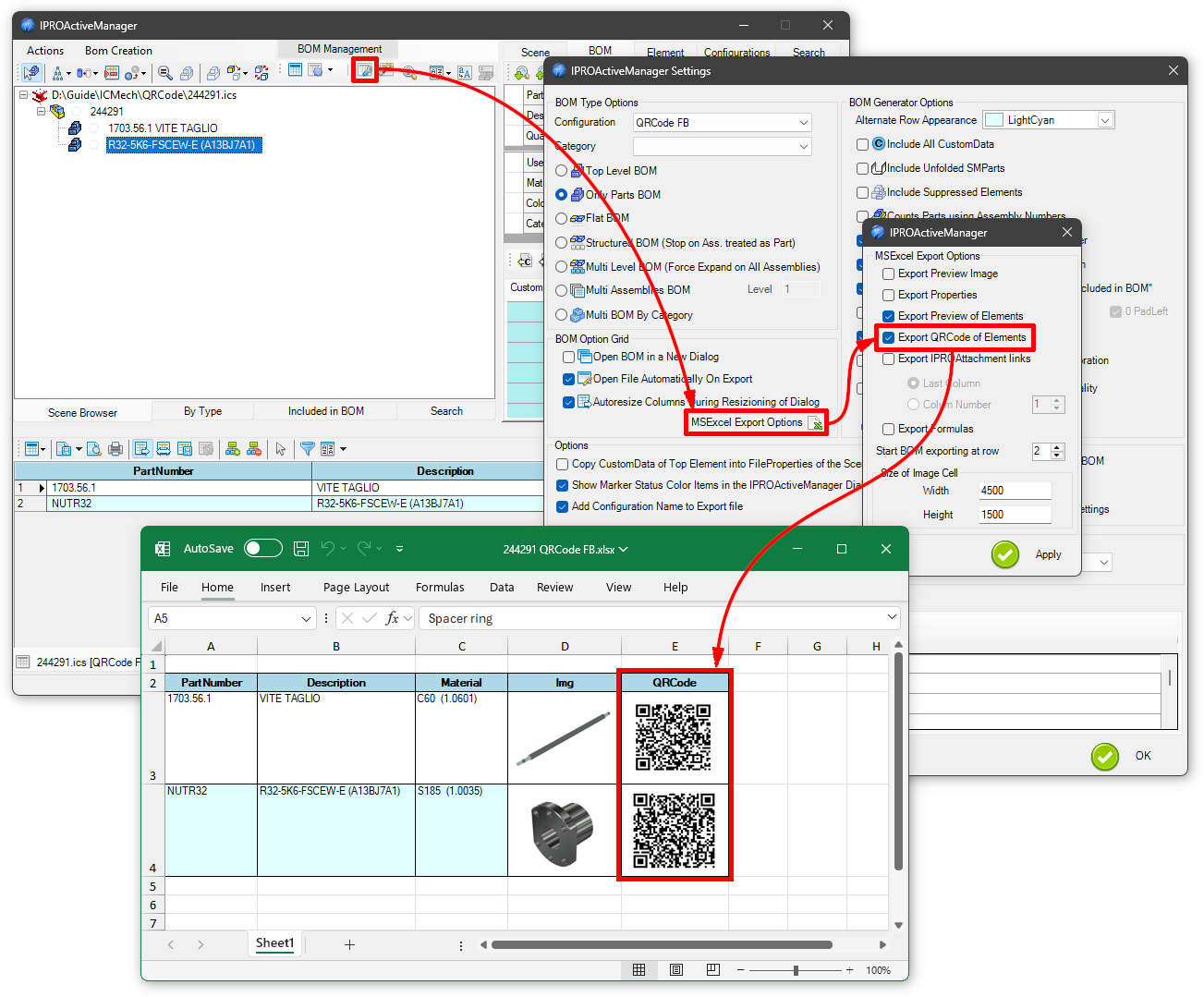
Added option to export the QRCode of parts to the Bill of Materials (Excel only).
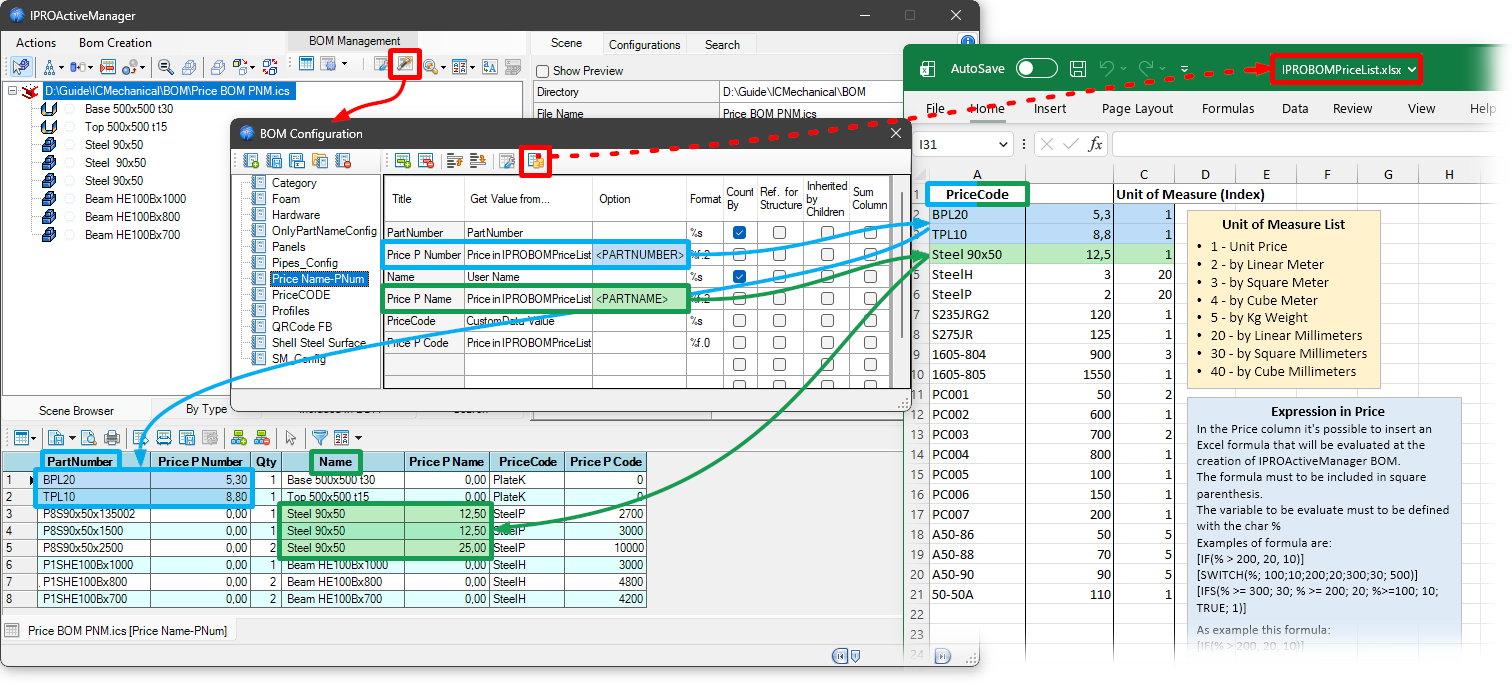
Added the ability to use <PARTNAME> and <PARTNUMBER> to search for the Excel file for prices based on the item name or code.
IronCAD Mechanical V. 2025.07
General
This update contains two new tools and several improvements implemented to meet customer need.
Furthermore, several changes have been included in order to make the application reliable and faster.
This is a new tool useful to analyze and report modeling problems presents in the part elements. The tool can analyze all the element in the scene, or only the active selection. When problems are found, the involved parts are reported in a grid. Users can select these parts, and using the buttons in the dialog, they can suppress/unsuppress, delete or try to change the Kernel of the selected problematic parts.
It’s also possible show transparent all the parts except the selected one, and to export a report of parts affected by problems to an Excel file.

This new tool that allows customers to define and save and group families of Property presets. A property can be a group of information to apply to the scene elements. These information can be: material, color, category, and custom data.
Once saved, these property presets can be quickly applied to other objects in the model with the Set Properties tool.
The properties are text files stored in the ..\Prefs\Properties\ folder. So it’s very easy to edit, create or share these properties between users in the same department.

A new behavior has been added in order to help the users to place the screwe in the right position respect the element under the first part selected for the placement. In fact, a new option allow to make transparent the part on which the command is dragged. This option can be activated when the first Automatic drill is active.
When the tool is closed, the transparency is automatically removed.


This tool has a new behavior useful to count different types of parts:
- When the users drag the tool with the left mouse button, the tool will count all the parts in the scene
- When the user drag the tool with the right mouse buttom, the tool will count only unsuppressed parts in the scene.
The user interface of this tool has been improved in order to allow the users to type the name of the required font.

Added a new option useful to Show/Hide in the Scene Browser the icons related to IPROAttachments and IPROPostItNotes.


Added the ability to generate multiple BOMs divided by category at once, assigning each category a different BOM configuration based on the same category name.

IronCAD Mechanical V. 2025.05
General
Several new settings have been added to the tools to meet customer requests. In addition, further im-provements were made to the code to ensure the reliability and speed of the application.
Added option to link text value to a CustomData, Parameter or BOMData.
Improved font selection by searching by typing the first character.

Improved the sketch of the Create Hole tool, which now extends symmetrically with respect to the origin.

Added option to not place intermediate pillars.

Improved the tool dialog, property values of found items are now editable, and added the option to keep values equal.

Added command to import from ASCII file coordinates to set points in a 2D profile.

Added ability to import SolidWorks and IFC files, and added a combo box, in which to digit (or paste) the folder you want to select.

Added a menu useful to select in a fast way the elements to export externally. This menu contains an op-tion to exclude IPROFasteners; and an option to manage the link of mirrored elements.

A new option allow the customer to apply a configuration to all the external linked files. The default behavior is to apply to the external link files the same configuration names. Anyway, it’s available a new Tab useful to define the relations between the external configurations with the main configuration. Furthermore, a new tab allow the users to see the properties of the external configurations.


In BOM Configuration, an ONLYQTY option has been added to the “SMBends info”. This option allows to report in the BOM only the number of bends.

Updated the dialog for managing Configurations (Relations and External Link) to adapt it the update of the Configuration Manager tool.

IronCAD Mechanical V. 2025.02
Geometry Equality Checker
A Geometry Equality checker has been implemented inside this latest version. This new infrastructure makes it possible to analyze parts in the scene in order to detect if two elements are equal.
Related to this new functionality, there is a new tool, placed in the ICM Tools catalog, and a new BOM option in IPROActiveManager. These tools speed up the verification and codification process, overall, in the case of imported Brep geometries. Anyway, due to the analysis of the geometries, the use of these new tools on big assemblies can require some time for the full elaboration.
This new tool, searchs all parts that are geometrically equal, to a selected reference part. The reference part could be selected interactivelly, or dropping the tool on the required part. The list of found elements reports User Name, PartNumber, Description and Material Name. Furthermore, the status bar reports the number of equal parts found.

This new option allows the customer to create a BOM where the parts will be grouped and counted by Geometrical Equality. When the user set this option, the elements in the BOM will not be count-ed using the “Count by” fields defined in BOMConfig. Anyway, the BOMConfig will be still used to define all the fields and the layout of the BOM

Added option useful to define a color to be applied to the element associated with each record. In this way every row of parameters/data defined in the grid can have a different color.

Added options to file name definition. Now it’s possible to define also Material, Material Code and Thickness. These values will be used if the selected part is a sheet metal part, and in case the re-quired property is not empty.

These tools has been improved and now, the structure of the treeview contains also the main nodes for Pipes and Flanges and a main node for Structured Parts.
This allow to have, at a first glance, the organization of the elements in the scene.

Also, the CountElements command shows the total number of parts found in the status bar.
Added new tool to remove transparency to parts in the scene.

General
A lot of improvements have been made inside the code order to ensure the reliability and the speed of the application. Furthermore, several new settings have been added to the tools in order to meet the requests of the customers.
IronCAD Mechanical V. 2025.01
Added option to create borehole equal to bearing outer diameter.

Added IntelliShape “CenterAxis” representing the axis of the spring.

Added choice to specify initial and final Railing Post.

Added self-locking nut with flange DIN 6926.

Added combo menu for material selection.

Added options to select, suppress/not suppress at treeview of Count Elements.

Added show the Empty Assembies.

3DS and OBJ formats added to export options.

Also added the coordinate triad from the anchor of the chosen element to the command.

Significant improvement in tool processing, improved detection of part drills. The elaboration time has been dramatically reduced using a new method to evaluate the interferences.
This new option in IPROSettings, controls the behavior of IPRODrill in case of any floating holes gen-erated.

The tool has been improved by separating Tab shapes from Slot shapes in the library elements. Re-garding slots, the ability to select the type of shape to be used has been added between: Squared, Rounded, Chamfered and Circular.

It is now possible to enter the slope angle (previously read only) to define the scale size.

PDF export of icd sheet uses as file name the name of the sheet.

When active, the “Copy 2D” option copy in the destination folder any existing files, having the name equal to the .ics file, and the extension equal to .icd or .exb. and .dwg.

Now, on the Catalog tab, you can also organize Catalog of Drawing.


The PRO-Active Manager tool has been enhanced and improved with new features.
The option to suppress all unselected elements, automatically executes the scene fit command.

On the By Type tab, show Empty Assemblies has been added.

Improved BOM processing of sheet metal parts. Now sheets are developed only if there are bends or if they are curved. This reduces processing time and avoids configurations for sheets that remain flat.
Price calculation is also done using the “formula” in Excel’s Price column; this allows the use of a formula within square brackets [ ], where the valuation variable is defined by the % character.
For example, one can evaluate the price based on whether the length (or weight) is greater or less than a given value.

Added <STEEL_RAW> option to the weight calculation in BOMConfig. With this option, any cuts at the ends of the IPROSteels are suppressed before calculating the weight. In this way, the weight is that of the raw material without cuts.

In the BOMConfig dialog, you can define the string in the definition of the Excel file to be used as the template for the BOM export.

This new option control the Level field in the case of Structured BOM.

General
A lot of improvements have been made inside the code order to ensure the reliability and the speed of the application. Furthermore, several new settings have been added to the tools in order to meet the requests of the customers.
IronCAD Mechanical V. 2024.01
Selection of different internal diameters is now possible.

Added the option to check the length of the thread even if the hole was a through-hole.

Improved Last Part Hole by adding control for extra length value for threading.

Improved the tool by adding forward and backward cutting tolerances (highlighting the blue Toll.1 and green Toll.2 colored disk).

Added new tool for searching and counting all elements with the same Name or PartNumber.

Improved the tool by adding additional data for export.

Improved dialog box for saving unlinked elements, now you can separately choose to export 2D and relink them to new 3D. Much improved text Search/Replace speed.

Added cartesian axis indicator at the point 0,0


The PRO-Active Manager tool has been enhanced and improved with new features.
Improved tree view management by adding icons indicating the status of the assembly (extended or to be treated as a part) and structured parts.

When exporting to Excel with a Seed Excel file, the start position placement of Titles can be de-finished using <#StartTITLEs>, and the start position BOM with <#StartBOM>.

In exporting Excel with Seed Excel: if in the first Titles row of the Excel file, there is a cell with a value already set, the export cycle will avoid overwriting it, but will go to the next empty cell.

Improved Multiple Export of Excel Files.
Improved option to export all grids to single Excel file. The improvement mainly affects export to a Seed file defined in the BOMConfig.

Added option to control the column to which to export the IPROAttachment.

Added option for Compressed Structured BOM, which will allow the right justified BOM level to be represented with 5 zeros (Ex. 0001.1.2)

Price calculation is also done using the “Option” field of the BOMConfig; this makes it possible to use different calculation methods with the possibility of being able to represent them in the same BOM.
Such as added the possibility of searching by material, adding the <MATERIAL> option for the Get Value from… “IPROBOMPriceList”.
- Added units of measure:
- 20 - by Linear Millimeters
- 30 - by Square Millimeters
- 40 - by Cube Millimeters

IronCAD Mechanical V. 2023.05
Added in Angular Steels the choice of cutting side.

Improved speed in positioning in large assemblies.
Added the feature of coloring threaded holes.
Added the option to disable automatic update of the hole name.

Adding a dialog box for managing and reordering settings.

The choice of having the threaded end instead of the bolt and placing the nut as the first component was added.

Improved tool and calculation of belt measurements.

Addition of the “+” flag that, if present in the name of a HWDrill, also cuts the parts that should not be cut (i.e., that the part name begins or ends with an underscore “_”).

Improved the tool in terms of stability and speed. The sheetmetal thickness is reported in DXF with the unit name set in the scene.
- Added the option to set the FileName using the SheetMetal material code.
- Added option to manage the export of threaded ICMechanical holes.
- Added the option to report in the DXF the Bounding Box of the face.
- Added option to export developed sheetmetal info:
- Area, Bound Area, External and Internal Perimeter, Bend info
- In the Face to DXF tool, this information is exported only if the face is from a developed sheetmetal.
- Added the option to also export a PDF.

Improved the dialog box for saving unlinked elements. Added dialog box for Find/Replace text and filling in the grid using formulas (to generate new Names and PartNumber).

New tool to detect and convert holes to editable Intellishape holes.

Adding the PartNumber field to the setting of pipe data files.

Added ability to paste fields from Excel; only one column can be pasted at a time. (If multiple columns are selected in Excel, the action is not performed).

Improved command, whit the addition of the option to overwrite the file if it is already there.

IPROPrint
Added option for DWG/DXF, to print Model or Paper Space. Furthermore, added option to print Black&White the selected drawings.

IPROExport2D
For PDF files, added to export in Black&White format. Added option to exporting Zero-Width Lines for all the formats.


The PRO-Active Manager tool has been enhanced and improved with new functions; improved import and export function of settings.
The option for surface calculation processes “hollow” Steels, so that the inner surface is not calculated. In addition, the unit of measurement can be defined in the option box of BOMConfig.

The sweep calculation option now also calculates pipe lengths. So now it is possible to have a BOM containing the lengths of pipes and bends. A BOM Configuration, named Pipes_Config.dat is included in the setup.

Improved the handling of the flag. This flag, if present in the BOM options, allows the field itself to be transferred within a CustomData. This is useful for all those fields such as weight, volume or expressions defined in the BOM grid.

Added option to export formulas in the BOM configuration as formulas in Excel cells.

Added the ability to manage the prices related to elements and display them in the PROActiveBOM. All the prices and the and calculation rules are store in the file IPROBOMPriceList.xlsx, which is filed in the ..\Prefs\ folder of IC-Mechanical.

Added the option to create BOMs divided by category.

IronCAD Mechanical V. 2023.01
Added new Steel Z profile.

Improved management of attachment points in order to coexist with any user-define points.

Added new Tool Trim at intersection for automatic cutting at intersections.

Added the possibility of creating the Sweep element along the 3D curve with any steel.

Added option to remove any existing cuts.

Added option to remove end cuts to IPROSteels dialog.

Corrected wording for cuts at profile ends.
Added possibility to insert final offsets to Stiffener.

Added the possibility of placing Custom Profiles along a path.

Added the possibility of suppressing bolt holes as well.

Suppression of columns in expanded dialog.

Added possibility to assign a user name dialogue PROActivePart.
Activation/deactivation of automatic grid resizing.

Ability to assign a colour to the part.

Added functions to manage parameters in different grids (named Groups).

Added grid and events for setting and managing Custom or BOM properties.

Added commands to assign automatic renaming to assemblies, so that children parts can be auto-matically renamed when the assembly name is changed.

Improved numbering functionality. Suppressed entities or those not to be included in the BOM are now not numbered. In addition, internally linked elements are now handled correctly, avoiding unnecessarily increasing the counter.
Improved file management Materials if the folder is mapped on the network, the correct solution is to transform the mapped drive name into the UNC name of the connection. E.g. Z: is changed to \ComputerName.

New elements added to the Pipes catalog.

Improved positioning of the threaded part in relation to the downturn.
The SelectionToConfig command allows the configuration name to be defined in the same way as the file name is defined for DXF export. To view these settings, simply drag the command with the right button.

Improved integration with mirrored elements.
Improved graphic management of the DXF file, now with the BendStyle.ini file, located in the ..\Template\Drawing\ folder, it is possible to set the level, line type and colour characteristics of the exported fold lines.
Added possibility to set the FileName using material and thickness.

Improved command, now when importing a 3D DXF file the layers are converted into assemblies.

Added a new Tool to automatically generate railings and fences.


The PRO-Active Manager tool has been powered adding several new features that improve the
productivity and made simple operations, that otherwise require a lot of time and management.
Image to attachment
Added button for creating an image of the scene, which is also added as an attachment to the se-lected item.

Assemblies Not in BOM
Added option to process children of an assembly not included in the BOM. Usually these assemblies are used as containers in order to be able to copy child elements more easily, but have no BOM-related functions. Child elements of non-coded assemblies are always processed anyway.

Improved the report of the developed face of a sheet metal. With option 1, it is possible to have the bounding box area of the unfolded face. With 0 or no parameter, the actual area of the unfolded face is reported.

Added options to obtain the number and radius of bends of a sheet metal part.
In the treeview By Type, sheet elements are now subdivided into flat sheets and sheets with bends.

Export image in BOM
Added command for exporting images (defining dimensions) of elements in BOM.

By Type BOM
Added possibility of distinguishing selected items in the TreeView By Type.

Search
Added possibility to select/hide/ghost found elements with search function.

Grid BOM Set Row Filter
New tool for filtering items in the BOM, with the possibility of creating customised filters.

Grid BOM in a New Dialog
Added the possibility of displaying bills of materials in a separate window (also as a default choice).

Preview
Improved management of previews.

Element Status

ICMechanical’s StatusMarker and IronCAD’s StatusMarker have been merged and all tools display-ing it have been updated.
IronCAD Mechanical V. 2022.03
Added a new tool to automatically rename parts in the assembly.

Improved the shape of Screw with nib.

Consolidated and improved tool: now it’s possible to relink 3D scene and drawing, and you will have a
detailed report.

- Added column with size of individual linked files, and total size of all linked files.

- Added the option to move the exported element to the scene origin.

Added ability to construct the file name of exported elements
with Part Number, Name and Description.

Added the option to replace element having the same User Name.

Added the ability to define both thickness of the angular steels.

- Improved the tool to trim/extend even with two steels at same time;

- And added ability to trim/extend only one side of the steel, drag the tool on the desire terminal with the Alt key pressed.

Added the feature to set the automatic calculation of both diameters (internal or external).

Improved integration with mirrored elements.


Added a new tool to regenerate all the elements in the scene.
Improved functionality using text in intellishape mode (add or remove material): now you can use the BOM data or CustomData of the part to fill the text.

Improved tool: now you can also export an additional 2D sketch shape and a txt file with face area and range.

Added ability to get the surface of the part.

Added the possibility – by drop the tool with right button – to set the property of the configuration.


Added the possibility to remove all parameters from the selected elements by dropping the tool by holding down the Alt key.
Added the possibility of suppression through the selection of the State or Category.

Added the possibility to set the Ghost status and the visibility through Color Status or Category.


The PRO-Active Manager tool has been powered adding several new features that improve the
productivity and made simple operations, that otherwise require a lot of time and management.
Suppress By Type
In the TreeView By Type was added the right click option to manage the suppression state type of the elements.

Material for Assembly
Now it is possible to assign material for the assembly if it’s set “to treat as part”.

Area and Perimeter in BOM
Added in BOM Configuration the possibility of calculating the area and perimeter of the unfolded sheet, with the choice of only external perimeter (0), only internal figures (1) or the sum of both (2).

Export to Excel
Added the possibility to set the linked cells by taking value from CustomData.

Element Status
Added a new tool to set and manage the Status of element:
Enabled the option in Settings and to set the status on assemblies or parts,

The Status is also available in the BOM Settings,

in the search filters,

and in the BOM table.


And, in the end, there is a new tool Set Status/color in the Utils catalog.
IronCAD Mechanical V. 2022.01
Add Post-It Note
A newly added option to remove Post-It Notes.

View Manager
- Newly added UI items for a precise camera control: target rotation setting (even with TriBall), setting the correct orientation upwards, fine rotation control (with angular step) and precise pan movement.
- Added the button to save all images at once.

Numbering PartNumbers
A newly added option to apply the same PartNumber to all elements in the active selection.

Steels – CustomSteel – Pipe – Flange
Added option to generate PartNumbers using the IPRONumbering tool.

Steels
- Consolidated and improved cutting tools.

- Improved positioning of Caps and Stiffener for steels. Depending on the type of cap placed, a prefix character modifies the PartNumber. Caps on steels are distinguished by cap at the base (prefix F), on top (prefix T) and end (prefix E), The Prefix Username and PartNumber options are also automatically checked and filled with the correct character.

Code Generator
Added a new option to detect the number of parts linked to each other.

Face to DXF – Export Unfolded Part
Lines and Bend Labels are grouped into two separate layers according to the direction of bend. There is also an option for setting the text height of bend labels.

Create Params By EXCEL
This tool is used to create/set the parameters from an Excel file. The selection on the Excel file is interactive, and the parameter will be created if they don’t exist. The value of the parameter will be driven by the Excel value.
An icon close to the part will show this condition. Furthermore, using the right click of the mouse will be possible to open the excel file, see the associated parameters, and update the parameters to the current value of the Excel file.

IPROActiveManager

The IPROActiveManager tool has been powered adding several new features that improve the productivity and made simple operations that otherwise require a lot of time and management.
UI Improvement
Improved the selection of Assembly treated as part, now there are two icons, one excludes the other.

Sort Ordering
Performance improvement in the calculation of reordering in the BOM.
Search Text
Added the possibility in the dialog of Search/Replace Text to convert the texts in UPPERCASE – lowercase – Title case.

Export to Excel
Added an option to export the IPROAttachment files (pdf, dxf, doc, web link, etc …) and insert the link to the attachment in the Excel file.

Rename Part
Added option < ParentName+PartName > to rename the parts so that they include the father assembly mane.

BOM Configuration
Added the “Where Used” option in the BOM Configuration.
The field whit this option is filled with the father’s element PartNumber.

IronCAD Mechanical V. 2021.05
PROActiveManager

The PROActiveManager tool has been powered adding several new features that improve the productivity and made simple operations that otherwise require a lot of time and management.
Search of Elements with empty PartNumber
- Some new functionalities help the customer to get in a fast way all the elements having an empty PartNumber. These elements are displayed in the “Not in BOM” TreeView with an icon representing an empty text.

- Furthermore, there is a new Fast Search command that get all the element in the scene that are without PartNumber.

- The Search section has been improved and now the search of empty fields has been simplified.

Management of the TreeView
- The nodes in the TreeViews are displayed using the IronCAD’s settings that allow to choose between PartName, PartCode and Description. In this way the texts show in the TreeViews of PROActiveManager are equal to texts show in the Scene Browser of IronCAD.
- Two new commands are available to expand/shrink the nodes in the main TreeView of IPROActiveManager.

- The main TreeView of PROActiveManager can be sorted in several ways. Options are available to define the sort order and to keep the TreeView automatically sorted.
- Added the reordering of the Tree View by Category.
- A new command allows the customer to order the IronCAD Scene Browser in the same way of the main TreeView of PROActiveManager.

- The settings that control the export of preview images and file properties, now also control the export to MS Excel Seed files.

Bom Configuration
- Added the possibility to obtain the length of the Sweeps and 3D curves.

- By setting the
<AddToCustom> option in the BOM configuration, the calculated value will be inserted into the CustomData of element.
Setting of Custom Data using Excel cells
It’s now possible set the value of a Custom Data using a cell of an MS Excel file. In this new version of PRO Active Manager there are tool for Set, Edit and Remove the connection with the MS Excel file. Furthermore, it’s possible to import and create Custom Data “linked” to Excel in a single operation. A new command allowsthe customer to update the Custom Data reading the value of the linked cell in MS Excel file. Furthermore, a new option controls the update action during the BOM creation.

- Selection of an MS Excel cell that will be linked to the Custom Data.

- Button to Edit and Remove the Link to Excel cell, and tool tip that show the current linked document.

- Button to import and create CustomData linked to Excel.


- Button to Update CustomData reading the Excel files.

- Option to Update CustomData linked to Excel during the BOM creation.

IPROExplorer
Improved functionality for displaying and management of file attributes (like visibility and ordering) and the ability to change or set it when saving

Set Drill Visibility
Added tool to turn HWDrill on/off

The User Interface of Set Material has been improved in order to allow the setting of Material and Description for Sheet Metal parts.

Set Excel Parameters
The parts that have parameters controlled by Excel on selection have an icon that characterizes them fx. In addition, the Part Properties menu has commands to: Show/Edit the parameter association, to Update the part by reading the value from Excel, and to Open the linked Excel file.

Custom Steel Library
Improved the management of the display mode change. Improved positioning and shape recalculation speed.

IPROPrint
The dialog of files to print has been modified to allow the selection of the pages to be printed.

Import DXF3D Scanned files
Improved the Tool to import files from Scanner, now supports importing 3D files from FlexiJet, and by dragging with the right button you can choose which elements to import.

Analyze Cylindrical Faces
New tool that allows you to return the number of holes grouped by radius.

Select all Linked Elements
New useful tool to select all linked elements within the scene.

IPROExportUnfold
This tool has been improved in order to manage the internal linked elements and the mirrored elements. Furthermore, the option dialog has a new option useful to place all the exported geometries on Level 0.
Other improvements have been done on the Quantity calculation and in the management of Imperial Unit of Measure.

IPRODocEvents
At the Save operation is possible to execute a count of element parts base on some filters defined in the IPROSetting tool. The result of the calculation is stored in a Custom Data named Quantity.

It’s possible to run immediatly the command using the tool Count by PartNumber placed in the ICM Tool catalog.
IronCAD Mechanical V. 2021.01
Export Unfolded Part
This tool was improved and some new settings are available in the dialog.

Face to DXF
There are some new options available for this tool. Furthermore, dragging the tool with the Right
Mouse Button, it will be available a dialog useful to set the options and to select parallel or coplanar
faces to export.

View Manager
This tool has been improved. Furthermore it’s now available an option to set image size.

Steels
Added an option for the replacement of Profiles equal to the one being modified.

PRO Active Manager
In the BOM Configuration is now possible to get the Single and the Total Weight of the element.

Create PROActiveParts
Added the ability to export DWG drawings for each record of the table.


3D Text
This creation of 3DText using the Smoot Profile (use BSpline) has been improved in order to respect the
sizebox Height set in the dialog.

Revision Manager
When a revision is created, a copy of the selected element is saved in the subfolder “Revisions” of the
current folder. Furthermore it’s possible to open the previous saved revision in a separate tab of the
active instance of IronCAD.


Set Category
Added new command in the catalog for setting the Category.

Set Color
Added new command in the catalog for setting the Color.

Import DXF3D Scanned files
Added tool for DXF3D import from scanners.

Create Blend Plane
Added tool for creating radius/curve profiles for tube curves.

IPROSettings
Revised section for saving IronCAD/Inovate settings.

Added a new tool useful to copy settings from the previous existing version of IronCAD/Inovate.

IronCAD Mechanical V. 2020.04
ProActiveManager
In the tree view By Type now shows the icon for externally connected objects and steel sections are now divided by Type (HE / IPN / Square tubes etc.) with the sum of the total length.

Improved handling of Custom Properties to avoid errors when editing multiple elements at the same time.

Steels
Improved performance in large assemblies (> 1000 parts) with many profiles connected externally.
Improved control for setting username on internally linked items.
Added a tool for placing parametric railing assemblies.

Improved trimming and extension commands.

Added a new QuickTrim tool to quickly trim or extend the outline to neighboring elements, also works with a multiple selection (drag with right button to show options).

Improved positioning on the 3D Path, it is now possible to set an offset using the triball,

Added the possibility to place the profiles on the 2D sketches.
The tool for positioning the Caps and Stiffener of the profiles has been improved.

Added the option to choose the section of the profiles: Detailed, Simplified, Squared, Squared Fill.

New standard aluminum profiles added.

CodeGenerator
Now if the required number of decimals is> 0, zeros are added to the integers as well.

ExternalLinkManager
Tree view of Unconnected elements has been improved to make the relationship with external linked elements clear.

Explode
Added more options to manage the direction and configuration of the explosion.

Export Unfolded Part
The handling of externally connected sheet metal elements has been improved.
Added more options in direct DXF export.
Now you can directly export bend lines and bend annotations without using an icd file.
In any case, the option to export the developed part using an icd file is still present and can be used as in previous versions.

Face to DXF and Profile to DXF
Added new option to IPROSettings to control the folder to export DXF files.

Added a new command useful for managing sheet metal parts and changing the type and thickness of a selection of sheet metal or all sheet metal parts in the scene.

BossThread
Added the possibility to change legislation to the threaded part.

ShapeUtils
Added a new tool for splitting objects within models into individual objects, with ours having no internal link maintained between them.

SlotHole
Added a new tool to create SlotHole with parametric control.

ViewManager
Added a new tool that saves and restores camera status, active configuration and item visibility. If the configuration is set to Default, this tool also stores the suppression status of the elements. It is a kind of “enhanced” Camera and Configuration Save, with a preview image and some text fields to use for documentation. All this information (images and text) can be exported to an MSExcel or MSWord document.

LibraryManager
Added a new application to check the values of standard components (Fasteners, Steels) within a tool window. Furthermore, by clicking on the StatusBar of the standard component, the relative LibraryManager dialog box will automatically be opened.

Export3D - Export2D - Print
Now you can drag and drop selected files from File Explorer to the tool dialog box list.

ConfigManager
New tool for easy configuration management.

Post-It Notes
New tool for managing notes. This tool is also available in the PROActiveManager user interface.

Holes
The holes in the Edit TreeView are grouped by type.

CADViewer - CombineDrawings

Several general improvements on these tools.
General
The application is now based on .NET Framework 4.8
Implemented support for 2K-4K monitors and dual screen configurations.
IronCAD Mechanical V. 2020.01
ProActive Manager

Added the possibility to stop the BOM elaboration pressing the Esc key.
Added the option to search empty fields using the condition Is/IsNot and inserting <NULL> as value of field.

Added the option to search Materials and Feature.

Added option to search/filter Surfaces Parts.

Added tool useful to manage the Ghost state of the selected elements.

Added the option to sort the BOM grid using several columns.

Steels
Added a tool for creation of structural Stairs.

Added a tool for placement of Railings.

Added a tool for the creation of caps and ribs.

Custom Steels
The UI has been improved. It’s now possible to organize the steel libraries in sub folders.
Furthermore, if the preview file is not present in the folder, the preview image is get from the .ics file.

Ghost Manager
Added a tool useful to manage ghost elements.

Isolate Elements
This tool has been revised and improved.

PRODrill

This tool has been revised and improved. In this version it’s about 35-45% faster respect the past.
Holes
Added an option useful to create a chamfer at the top of the hole.

Elements Along 3D curve
Improved the tool to Place Elements along a 3D wire.

Explode
This tool has been completely revised and improved.

IronCAD Mechanical V. 2019.02
Revision Manager
Added the new tool Revisions Manager for arrange and review the revisions of the parts/assemblies in current scene.

Isolate Elements
Added new Isolate Element command for hidden part management.

Set Transparency
Added the new Set Transparency command to manage the transparency status of parts.

Fasteners
The management of the automatic holes has been reviewed and improved.

- Added new Hexagonal head Screw with flange.
- Added new Hexagonal Nut with flange.
Steels
Added the possibility to place the steels along the selected 3D path.

- Improved cutting/extension functionality.
- Fixed some problems related to measures in inches.
- Possibility to manage the Standard of the user in the “..\Norme\User\NameStandard” folder.
- Added the custom external surface to the tubular profiles.

- Profiles 8 9 13 14 15 16 17 18 can have within the Data File a useful section to define the Blend Radius applied to the profile.

This section has the following format:
## -------------------------------------
## Round definition
##
## Thickness | Ext.Round | Int.Round
> 1.0 | 0.0 | 0.0
> 1.2 | 0.0 | 1.0
> 1.5 | 3.0 | 0.8
> 2.0 | 4.0 | 1.0
> 2.5 | 5.0 | 1.5
.....
.....
As shown in the example, the value 0 is accepted and has the meaning of a missing Radius.
In the event that the Int.Round value is not defined, the Inner Radius will be equal to = (External Radius - Thickness).
In the event that the section relating to the fittings is not defined, the values of the Radius will be equal to = (Thickness/2).
Custom Steels

Possibility to define a different material for each type of Custom Steels and the type of material by default (in the file IPROLIbBOM.INI).
Create Tabs and Slots
Improvement, automatically detect the thickness of the element in contact with the one to insert the tabs.
- Added positioning mode and custom length.
- Added the positioning mode without the possibility of edit with dialog.

External Link Manager
Revised and improved the external file saving function.

Gears

Fixed some problems related to measures in inches.
Corrected some features related to bevel pairs.
Face to DXF

Now the texts are placed in the IPROLabels layer
Create Params By Excel
Added new command for importing parameters from MS Excel.

Code generator

The SM_Unfold option set in the sizebox calculation allows to obtain the value of the developed sheet-metal.
Possibility of obtaining the value of the custom data from the parent, using the expression ..\NameCustom
and get the value from the child, through the expression ..\Assy1\Assy2\Part\NameCustom
The Custom Data grid show all the custom data defined for the element.
Holes
Added option to define the exact diameter value on threaded holes.

Place on Wire
Added the possibility to place the pipes along the selected 3D path.

Cut Pipe
Improved cut command. Now it is possible to insert elements along a tube, cutting the tube itself.

Modify Pipes
Added a new command to change the size/thickness of all the tubes within an assembly.

Suppress Manager
Added method to Select/Delete/Suppress/Unsuppress elements based on their color.

IPRO CAD Viewer – Face to DXF
- Added Zoom and Panning features.
- Added change color to background/element.
- Added view on/off level and change color.

Create PROActiveParts
Improved visibility of editable fields.

PRODrill

Rewritten the function for calculating the position of the hole. Now, hole mirrored are make correctly.
Set Material - Custom Steels - Steels

Material management changed.
Materials changed with IPROSetMaterial were not updated to the new value after a component change or
update. To do this IPROSetMaterial now sets the variables Name 16 and 17 with file name and material name.
Edit Materials (IPROSettings - Set Material)
Added the command to edit the material files.

ProActiveManager

This tool has some new functionalities. Furthermore some existing functions have been improved.
- Revision - Added new tool to set up revisions in the elements present in the scene.

- Analysis - Improved assemblies analysis function (weight, surface, volume).
- Display - Sort of the Tree View and display icons of elements treated as surfaces.

- BOM - Added the ability to create a BOM of all the selected items.

- Mass Density - Added possibility to report Mass Density as field of the BOM.

- GetFrom parameter - In resolving the GetFrom parameter, all the child parameters of the element are also considered.
- SheetMetal Unfold dimension - The SM_Unfold option set in the sizebox calculation allows to obtain the value of the developed sheetmetal.
- CustomBOM - Implemented option to allow the definition of a label for the SumColumns function.The modification now allows setting the LABEL
colRel parameter, String. Where: colRel defines the displacement with respect to the column containing the sum. For example -1 means the previous column.Instead, the string is the value of the label to be set in the cell. Example: SUM (C7) after 5 LABEL -1, Total weight (kg).
IronCAD Mechanical V. 2018.02
Settings

New settings are available in the IPROSetting window (called from the Windows Start menu).
A new Tab has been added to handle the catalogs to be loaded at the start of IronCAD.
Added a set to automatically create a preview image file when save the 3D file (the image file is saved in the same folder of the 3D file).

Added an option to save CustomData to the file properties, when saving the 3D file.

Add Attachment
It’s possible to add a Description to the Attachment.

External Link Manager
Copying 2D files now also copies the .exb files.
Added the option to also copy the current scene.

Export Face

This tool has been improved.
Text3D
Now it’s possible to get the text from a CustomData or a BOM information.

Fasteners

Fixed error in inserting a screw into an externally linked assembly.
Added the possibility to have a threaded hole as the first automatic hole.

Trim Steels
Added start and end tolerance for cutting steels.

Extend Steels
Multiple selection allowed to extend profiles to one face.

Gears

This tool has been improved and some issue related to setting of BOM information have been fixed.
Added the possibility to pair two gears by selecting them and dragging the command with the right mouse button.
Improved the positioning a new gear over existing gear. Added a new option that, if you find two gears when you start the command, sets the correct position.

Now it’s possible to export all sheet metal elements of the scene by dragging the command into an empty area.
In addition to ICD export, it is now possible to export directly to DXF.

Grooves

Improved management of shapes A and B.
NPT Holes

Fixed the issue related to the placement of the thread bitmap if the kernel of the part was ACIS.
Holes
Added an option useful to color the simple holes.

Get Coordinates

By dragging the command with the Shift key pressed, all selected items are automatically transferred to the grid.
Create Tabs and Slots
New tool for creating tabs and slot for sheet metal.

Pipes Catalog

Fixed pipe cutting problem when elements was in different subassemblies.
Now it’s possible to set the color of the pipes adding new fields into the DataFile.

Update All GenCode Parts

This tool has been improved. The performance in updating element is 80 % better respect previous versions.
ProActiveManager

This tool has some new functionalities. Furthermore some existing functions have been improved.
- Calculation Weight - The calculation of the Weight in the BOM is 60% faster respect previous versions.
- IPROCodeGen Expressions - Now it’s possible to edit the expressions related to IPROCodeGen tool.

- Data and Property - A new option is available to automatically copy the CustomData of the parent element and its linked elements in the file properties.

- Filter by Category - It has been added the ability to filter BOM elements through a list of Categories.

- Exclude Categories - Added the ability to define categories to exclude from the list.

- Excel Exporting images - A new section in ProActiveManager settings allows you to define whether to export the individual images for each BOM element to Excel.

- Preview Import Excel Files - When you import an Excel file into the BOM, you can now see a preview, and the different row it will be marked with the pencil icon.

- Zoom to Selection - Added new command in the action bar: Zoom to Selection; clicking on the icon will zoom in the item, and if you repeatedly click on the command over, the rotation will also be activated in the six canonical views: front, top, left, right, back and bottom.

IronCAD Mechanical V. 2017.03
Fasteners & Component
The tools “Fastener” and “Steels” have been improved. Furthermore on all components of the IC-Mech catalog, two new buttons are available to open the related data files.

Gears
Some new Pulley components have been added to the library.

Spring

This tool has been improved. Some functions have been rewritten in order to improve performances and usability.
Capture Image

The Capture Image tool has a new button useful to capture the image of the current selection. Furthermore the quality of the captured image has been improved.

Text3D
This tool has been rewritten in order to improve the scalability of the element and the usability of the tool. The UI allow the customer to better control the 3D model.

Numbering Elements
The tool has been improved and enhanced with new features. In this version is possible to define and control the field Category. Furthermore the numbering items are available in the dialogs related to Save, Save As and LinkManager.

Replace Elements
This new tool allow the customer to replace an element in the active scene with another external linked element. The UI allow the customer to define the related to the replacement.

Insert Element
This new tool allow customer to manage an UserLibrary of models. The UI of the tool allow the customer to browse the Library and to place the element into the scene. An option allow to insert the model as external linked model. Double clicking on the inserted element it’s possible to edit or replace it.

Export Elements
Adding to the element name correction option (for AutoCAD and MicroStation compatibility)

Export Face

This tool has been improved in order to work also on scene having Units set to inches. With this new version is possible to export the BSplines a stroked segments. The IPROSettings program has a section useful to set this parameter.
IPROSetting
It has been enhanced to include new settings.

Code Generator
This tool has been improved. In this version is possible to get some new types of variables, and it’s possible to define a standard template of variables.

Create PROActiveParts

Excel - The tool has been enhanced to allow the change of parameters via Excel.

Tags - In this version is it possible to define some tags that are evaluate during the placement of the PROActivePart:

@ - This tag means that this parameter will be inserted manually by the user. If you insert a numerical value after the @, this value will be used as default.
Example:
in this example the values @71.5 - @37 - @45 can be changed and entered manually

[ x1;x2;x3;…;xn ] - This tag means that the user will be choose between a series of defined values. The defined values must to be placed inside the [ ] chars, and must to be separated by a semicolon.
Example:
[5;8;10] - in this example the values 5 - 8 - 10 will be available in the combobox

<xMin;xMax> - This tag means that this parameter will be inserted manually by the user. The value of the parameter must be between xMin and xMax.
Example:
<80;250> - in this example, you can manually enter a value between 80 and 250.

Edit TitleBlock
Enhanced and added the ability to create QRCode.

ProActive Manager

This tool has been improved in several sections of the UI. It has some new functionalities about import and export data. The BOM creation and export have been improved.
- Color/Category - Added color and category in the properties. The color can be chosen from RAL or Pantone, the category can be defined by the user.

- Import/Export CustomData - A couple of dropdown menu allow users to import export CustomData to Excel or CSV files.

- Settings to MSExcel export - A new section in the IPROActiveManager settings allow users to better define the export to Excel, now you can export the image and the properties, and choose which row to start exporting the BOM.

- More Tags available in the BOM Configuration dialog - New tags are available in the Tag list of BOM configuration, Row Counter, Surface and Volume of element.

- IPROAttachments - IPROAttachments are directly available in the dialog of IPROActiveManager. Users can say them, or they can directly attach a new document to the selected element.

- Search functionalities - Search functionalities has been improved. Selecting the “Search Result” node is now possible to create a BOM of the found elements or to manage them with other tools available in IPROActiveManager