Mech Catalog
This is the catalog that contains the normalized elements UNI, DIN, ANSI, ISO and JIS, Steels and steel tools.
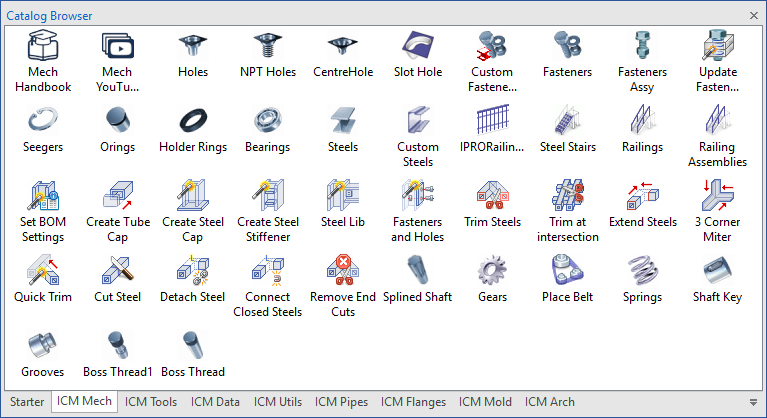
- Holes
- NPT Holes
- Centre Holes
- Slot Hole
- Fasteners
- Fasteners Assembly
- Fasteners Library
- Update Fasteners Holes
- Seegers
- Orings
- Holder Rings
- Bearings
- Steels
- Custom Steels
- RailingsXT
- Steel Stairs
- Railings
- Railings Assemblies
- Set BOM Settings
- Create Steel Cap / Tube Cap
- Create Steel Stiffener
- Steel Lib
- Fasteners and Holes
- Extend Steels
- Trim at intersection
- Trim Steels
- 3 Corner Miter
- Quick Trim
- Cut Steels
- Detach Steels
- Connect Closed Steels
- Remove End Cuts
- Splined Shaft
- Gears
- Place Belt
- Springs
- Shaft Key
- Grooves
- Boss Thread1
- Boss Thread
The Holes tool is used to create any type of normalized hole on the part.
The Holes-NPT Holes tool is used to create NPT Hole (National Pipe Thread) in the scene.
The CentreHoles tool is used to create Centre Hole on the shaft part.
The Slot Hole tool create slot on the part.
This dialog box is displayed every time you drop the Fastener tool in the scene or when you edit an existing component.
This command is used to place in the scene an assembly composed by a screw, washers and nut.
With this tool you can insert an fasteners element from your library of files into the scene.
The “Update Fastener Holes” tool allows to recalculate the automatic drilling functions produced by the bolts to which they are associated; for example if a part has been inserted that must be drill, or if a bolt has been removed.
The Seegers tool is used to create Seeger on the shaft part.
The Orings can be placed also on cylindrical parts, drop the tool on an circular edge or face and the Orings inherits the shaft dimensions.
The HolderRings can be placed also on cylindrical parts, drop the tool on an circular edge or face and the HolderRings inherits the shaft dimensions.
The Bearings tool is used to create Bearing on the shaft part.
Steels tool allow to place steel profile in the scene 3D, with the possibility of managing different characteristics, such as choice of profile, automatic connections, final cuts, length calculation.
Custom Steels allows to place user profiles using the characteristics of the tool IPROSteels, such as the points of attachment and the cuts at the ends.
With this command you can insert many different types of parametric railings into the scene.
This command is used to place in the scene a steel staircase assembly consisting of steps, side elements and landing platform.
This command is used to place in the scene a railings assembly consisting of a railing post, handrail elements, intermediate rail and kick strip.
This command is used to place a parametric railing assembly in the scene.
With Set BOM Settings you can change the BOM settings for the whole scene, drag the tool into the scene and choose which settings you want to change.
The Create Steel Cap and Create Tube Cap tools allow the automatic creation of end plates and caps directly on structural steel profiles.
With this tool, you can add various types of Stiffener to steel; simply drag the tool onto the steel.
The Steel Lib tool provides access to a library of predefined standard joints.
With this tool, you can add various types of Fastener to a steel plate; simply drag the tool onto the steel surface.
With the Extend Steels command, you can extend (or cut) two steels with each other or to a face.
With the Trim at intersection command, it is possible to trim the selection of steels with two or more steels at their intersection.
With the Trim Steels command, you can trim (or extend) one or more steels with one or two steels as a reference for the cut.
The 3 Corner Miter tool enables users to cut three steel beams at their intersection.
Quick trim allows you to cut or extend selected steels to the first intersection (in both directions).
With the Cut Steel command, you can cut steel into two parts by entering the distance (and possibly the offset before and after cut) from the beginning (or using TriBall) or you can cut multiple steels together.
Disconnect steels that are connected to each other with attachment points.
Connect the steels that had been disconnected with their attachment points (if any).
This tool removes cuts from steels. (Cuts created with: Quick Trim, Trim Steels, Trim at intersection, Extend Steels, 3 Corner Miter).
This tool is used to automatically position a splined shaft on a selected shaft.
The Gears tool is used to create Spur, Rack, Bevel, Sprocket or Pulley in the scene or when you edit an existing component.
The Place Belt tool is used to place automatically belt around a selection of pulley.
The Springs tool is used to create Springs in the scene or when you edit an existing component.
The ShaftKeys tool is used to create ShaftKey on the shaft part.
The Grooves tool is used to create grooves or chamfers on the shaft part.
The BossThread 1 tool is used to Boss Thread whit run-out and cylinder on the shaft part.
The BossThread tool is used to Boss Thread on the shaft part.